Best 2 in 1 Printers and Printing Solutions for Home and Office
Looking for versatile printing solutions that combine multiple functions or streamline device sharing? This guide features the best 2 in 1 printers alongside practical USB printer cable splitters, label makers, and compatible label supplies. Whether you need wireless all-in-one printing or efficient printer sharing between computers, these products are tailored to meet various home, office, and small business needs.
| Product | Brand | Main Features |
|---|---|---|
| Canon PIXMA TR4720 Wireless All-in-One Printer | Canon | Print, Copy, Scan, Fax; Wireless; Auto Document Feeder; Mobile Printing |
| NIIMBOT B1 Bluetooth Thermal Label Maker (Blue) | NIIMBOT | Portable Label Printer; No Ink Required; Multiple Templates; Smartphone & PC Compatible |
| NIIMBOT B1 2 Inch Thermal Label Printer (Silver) | NIIMBOT | Thermal Printing; Automatic Label Detection; Smartphone & PC Support; Energy Saving |
| HOXIBSL Printer Cable Splitter 2 in 1 Out | HOXIBSL | Share One Printer Between Two Computers; USB 2.0; Compatible with Various Brands |
| biaze USB 2.0 Sharing Switch for Two Computers | biaze | Dual-PC Sharing for USB Devices; 3.5m Cable; Plug and Play; Supports Printer, Scanner, Keyboard |
Canon PIXMA TR4720 Wireless All-in-One Printer

The Canon PIXMA TR4720 is a reliable wireless 4-in-1 device that offers printing, copying, scanning, and faxing capabilities. Designed for home use, it features an auto document feeder making multi-page tasks easier. The printer supports mobile printing via Canon’s app, ensuring flexible operations from smartphones or tablets.
It boasts efficient power consumption at just 7W during operation and impresses with print speeds of 8.8 pages per minute (black/white) and 4.4 pages per minute (color). The simple ink cartridge setup makes replacements straightforward. This model prioritizes convenience and is ideal for everyday home or small office requirements.
NIIMBOT B1 Bluetooth Thermal Label Maker (Blue)

The NIIMBOT B1 is a portable 2-inch thermal label printer that doesn’t require ink or toner thanks to its direct thermal printing technology. Compatible with iOS and Android phones (not iPads), it connects via Bluetooth with the dedicated NIIMBOT app offering over 1500 symbols, barcodes, QR codes, and multiple fonts.
Ideal for organizing at home or labeling products in small businesses, it supports label widths from 20 to 50mm. The app includes pre-made templates for fast label creation. This label maker streamlines labeling tasks and supports various contexts such as school, office, and retail environments.
NIIMBOT B1 2 Inch Thermal Label Printer (Silver)

This silver version of the NIIMBOT B1 label maker supports thermal printing with label width ranges from 1 to 2 inches. It includes one roll of label tape and features automatic label recognition for faster, error-free printing. It’s inkless, conserving costs over time.
The printer is compatible with both smartphones and PCs, requiring the NIIMBOT app or PC driver respectively. Energy-saving settings with customizable auto power-off times improve battery life. This model suits users needing efficient label printing for business or household purposes.
HOXIBSL Printer Cable Splitter 2 in 1 Out

The HOXIBSL cable splitter allows two computers to share a single printer. It features a key switch to toggle the printer’s connection between computers seamlessly. Supporting a USB 2.0 transmission rate up to 480 Mbps, this splitter offers faster and more stable performance than wireless alternatives.
It is compatible with all USB-A ports and works with various printer brands including Samsung, Canon, HP, Brother, and MacBook Pro. This device is ideal for shared office setups requiring controlled access to one printer from two PCs without network configuration.
biaze USB 2.0 Sharing Switch for Two Computers
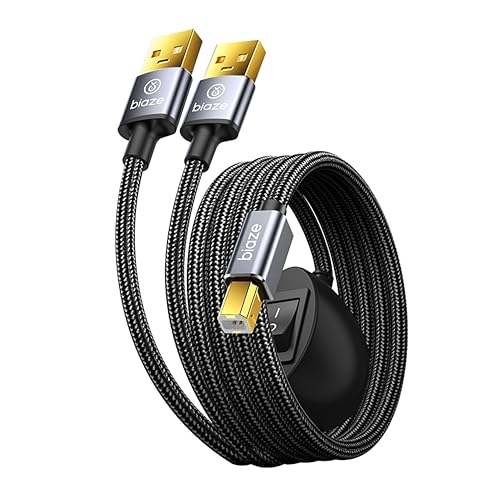
The biaze USB 2.0 sharing switch connects two computers to one USB peripheral device such as a printer, scanner, or keyboard. It features plug-and-play functionality with no driver installation needed and includes a 3.5-meter cable for flexible workstation placement.
Supporting USB 2.0 transfer speeds up to 480Mbps ensures lag-free data transmission. This device enhances workspace efficiency by enabling quick switching between computers without replugging cables, making it a practical accessory for home offices and workplaces.
Buying Guide for 2 in 1 Printers and Printing Solutions
Consider Your Primary Use
Determine whether you need a multifunction printer that combines printing with scanning, copying, and faxing capabilities, or if a specific device like a label printer or cable splitter better suits your needs. Home users typically prioritize ease of use and wireless capabilities, while businesses may look for speed and versatile media compatibility.
Connectivity and Compatibility
Wireless printing has become standard; however, USB-connected solutions are still relevant, especially for shared devices. Check compatibility with your operating system, mobile devices, and any software requirements. Bluetooth label makers often require dedicated apps, so ensure your device supports these apps.
Ink vs. Inkless Printing
Inkjet 2-in-1 printers use ink cartridges and provide color printing, suitable for photos and documents. Thermal label makers require no ink or toner, relying instead on heat-sensitive paper. Thermal printers are excellent for labels and barcodes but not for full-color photos.
Print Speed and Quality
For frequent high-volume printing, consider print speed specifications measured in pages per minute. Resolution impacts text and photo clarity, so choose one that balances speed with acceptable print quality for your use case.
Energy Consumption and Efficiency
Energy-efficient models with low power consumption can reduce electricity bills. Features like automatic power-off and standby mode prolong device lifespan and conserve energy.
Label Size and Customization (For Label Printers)
If opting for label printers, verify supported label sizes and customization options. Access to templates and symbols through connected apps can enhance productivity and design appeal.
Device Sharing and Switching
If printing needs to be shared between multiple computers, USB splitter or sharing switches simplify hardware connections and avoid costly network printer setups. Confirm compatibility with your computers and devices and consider cable length for flexible workstation arrangements.