Best 3-in-1 Printers for Efficient Home and Office Use
Finding a reliable and versatile printer that combines printing, scanning, and copying capabilities is essential for home offices and small businesses. Below is a summary table of the top 3-in-1 printers available on Amazon, showcasing models that balance performance, features, and wireless connectivity.
| Printer | Brand | Key Features |
|---|---|---|
| HP OfficeJet Pro 8125e | HP | Wireless, Duplex, Auto Document Feeder, Fast Color Printing |
| Canon PIXMA TR4720 | Canon | Wireless 4-in-1, Auto Document Feeder, Built-in Fax |
| Brother DCP-L2640DW | Brother | Monochrome Laser, Duplex, Auto Document Feeder, Alexa Compatible |
| Epson EcoTank ET-2800 | Epson | Cartridge-Free Ink, High-Capacity Tanks, Wireless |
| Epson Workforce Pro WF-3823 | Epson | Fast Print Speed, Duplex, Touchscreen, Auto Document Feeder |
HP OfficeJet Pro 8125e Wireless All-in-One Printer

The HP OfficeJet Pro 8125e is designed for home offices needing quality color prints for documents, reports, and flyers. It offers print speeds up to 10 ppm in color and 20 ppm in black, with upgraded features including fast color printing, scanning, copying, automatic two-sided printing, and a 225-sheet input tray. The auto document feeder (ADF) efficiently manages multi-page scanning and copying tasks.
Connectivity is seamless thanks to dual-band Wi-Fi that detects and resolves connection issues automatically. The printer includes 3 months of HP Instant Ink, helping reduce running costs and ensuring uninterrupted printing. Its reliability and performance make it a strong option for small businesses or professional home users.
Canon PIXMA TR4720 Wireless All-in-One Printer

The Canon PIXMA TR4720 is a compact 4-in-1 printer tailored for home use, combining print, copy, scan, and fax functions. It features an auto document feeder for convenient multi-page tasks and supports wireless mobile printing, making it versatile for modern workflows.
Power consumption is economical at 7W in use, with standby and off modes reducing energy use further. Printing speeds reach 8.8 ipm in black and 4.4 ipm in color, suitable for everyday document and photo printing. The printer is designed for easy ink cartridge installation and replacement, simplifying maintenance.
Brother DCP-L2640DW Wireless Monochrome Laser Printer

Ideal for small businesses requiring speedy black-and-white printing, the Brother DCP-L2640DW combines print, scan, and copy in a compact laser unit. It can print up to 36 pages per minute and scan at speeds up to 23.6 ipm (black), facilitating high-volume document handling.
The efficient 50-page auto document feeder supports batch jobs, saving time on multi-page documents. Connectivity includes dual-band wireless and Ethernet for secure, flexible wired or wireless connections, as well as USB for local device access. Compatibility with voice assistants like Alexa adds convenience.
Epson EcoTank ET-2800 Wireless Color All-in-One Printer

The Epson EcoTank ET-2800 stands out with its cartridge-free, high-capacity ink tanks that significantly reduce the cost of replacement ink. The included ink bottles enable users to print up to 4,500 black-and-white pages or 7,500 color pages, providing dramatic savings and fewer refills.
This wireless all-in-one printer covers basic home needs with printing, scanning, and copying. It supports hassle-free refilling with Epson’s exclusive EcoFit bottles that minimize spills. The EcoTank printer is designed to work within typical home temperature ranges and ensures stress-free printing for long-term use.
Epson Workforce Pro WF-3823 Wireless All-in-One Printer
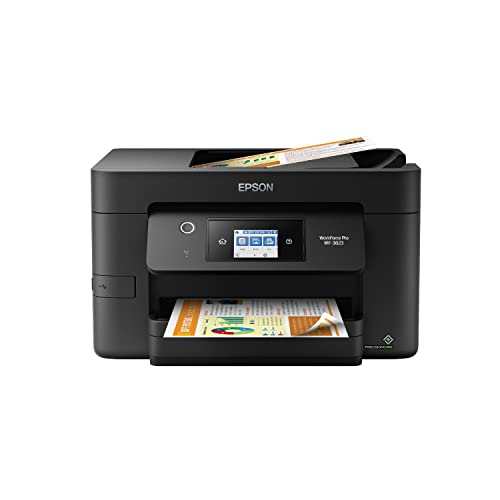
The Epson Workforce Pro WF-3823 caters to users needing fast, professional prints with its PrecisionCore Heat-Free Technology. It offers print speeds of 21 ppm in black and 11 ppm in color, alongside instant-dry DURABrite Ultra pigment inks for sharp, smudge-resistant documents.
Additional features include automatic two-sided printing, a 35-page auto document feeder, and a 250-sheet paper tray, enhancing productivity for busy work environments. The 2.7″ color touchscreen simplifies navigation, while connectivity options support wireless printing, perfect for office or home office setups.
Buying Guide for 3-in-1 Printers
Printer Type: Inkjet vs Laser
Inkjet printers like the HP OfficeJet Pro and Epson EcoTank models provide high-quality color printing, ideal for photos and documents with color graphics. Laser printers such as the Brother DCP-L2640DW excel in fast, sharp black-and-white text output and are better suited for heavy document printing.
Print Speed and Volume
Consider your daily printing volume. For frequent, high-volume tasks, laser printers offer faster speeds and lower cost per page. Inkjet printers generally print slower but are more versatile for color and photo printing.
Connectivity Options
Wireless connectivity is essential for convenience. Look for dual-band Wi-Fi support to ensure stable connections. Some models offer Ethernet and USB options for varied connection scenarios. Mobile printing capability is a plus for remote printing via smartphones or tablets.
Additional Features
- Auto Document Feeder (ADF): Useful for multi-page scanning and copying, saving time on manual feeding.
- Duplex Printing: Allows automatic double-sided printing, reducing paper usage.
- Touchscreen Interface: Enhances ease of use with intuitive controls.
- Ink Efficiency: EcoTank printers reduce ink costs with cartridge-free refillable tanks, an important consideration for budget-conscious users.
- Fax Capability: Still relevant for some home offices, as seen in Canon PIXMA TR4720.
Maintenance and Running Costs
Check ink or toner replacement costs. Cartridge-free or high-capacity ink tank models generally offer long-term savings. Also, consider reliability and brand support for maintenance.
Size and Footprint
Assess the available space and choose a compact printer if needed. Laser printers may be bulkier, while some inkjets provide smaller footprints suitable for tight spaces.