Best 3D Printers for Classroom Use With Easy Setup and High Precision
Choosing the right 3D printer for classroom use requires a balance of ease of use, safety, and reliability. Here we review the best 3D printers ideal for educational environments, including starter kits for beginners, WiFi-enabled models, compact designs, and advanced options with high-speed printing and safety filters. Below is a summary table highlighting key features of the selected printers designed to support STEM learning and creativity in schools.
| Product | Brand | Key Features | Build Volume / Size |
|---|---|---|---|
| TINA2S 3D Printer with WiFi Printing | WEEDO | Fully assembled, auto-leveling, WiFi cloud app control, ultra-quiet operation | Compact desktop size |
| Official Creality Ender 3 3D Printer | Comgrow | Open source, resume printing, advanced extruder, V-shape wheels for silent operation | 8.66″ x 8.66″ x 9.84″ |
| Fully Assembled Mini 3D Printer Starter Kit | Asani | Complete starter kit, auto leveling, compact size, 10M PLA filament included | 8.3″ x 8.3″ x 11.4″ |
| FLASHFORGE AD5M Pro High-Speed 3D Printer | FLASHFORGE | 600mm/s speed, fully enclosed, auto-leveling, HEPA + carbon filter for safe printing | Large build size; enclosed chamber |
| 3D Printers Tina2 Basic with Magnetic Platform | Entina | Fully assembled, auto leveling, compact and portable, resume printing, user friendly | 100 x 105 x 100 mm |
TINA2S 3D Printer with WiFi Printing by WEEDO

The WEEDO TINA2S 3D Printer offers a perfect solution for educational settings with its fully assembled design ready right out of the box. It features automatic bed leveling which simplifies setup, ensuring accurate print results every time, ideal for students and beginners. The integration with the Poloprint Cloud App provides WiFi connectivity for remote and seamless control via smartphones or tablets, supporting Windows, Mac, and Linux platforms. In addition, this model operates ultra-silently, making it conducive to classroom environments where noise can be disruptive.
Official Creality Ender 3 Fully Open Source 3D Printer
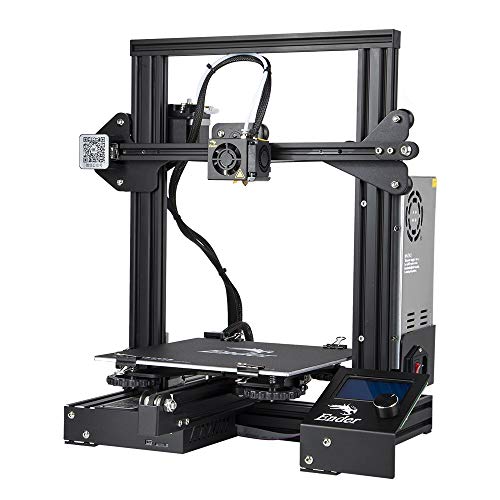
The Creality Ender 3 is highly favored in classrooms for its DIY assembly experience, giving students the opportunity to learn hands-on skills during setup. It features an advanced extruder designed to reduce clogging and ensure smooth filament feeding. The printer includes a resume printing function, which is critical for environments prone to power interruptions. The V-shape wheels and POM track guarantee quiet, smooth movement. This open-source printer is ideal for intermediate learners and promotes STEM education through direct engagement with hardware.
Fully Assembled Mini 3D Printer Starter Kit by Asani

The Asani Mini 3D Printer Starter Kit is designed specifically for beginner-friendly use in classrooms, providing a complete kit with 10 meters of PLA filament, an SD card with preloaded models, and splicing software. Its auto-leveling mechanism coupled with a dual z-axis rail ensures high precision prints. Its compact footprint and lightweight make it easy to move and accommodate any classroom setting. This model supports all standard OS platforms and includes a flexible magnetic build plate for easy print removal.
FLASHFORGE AD5M Pro High-Speed 3D Printer for Education

The FLASHFORGE AD5M Pro brings professional-grade capability to classrooms with its coreXY structure supporting speeds up to 600mm/s and precision engineering. It boasts a fully enclosed design featuring a dual filtration system with HEPA13 and activated carbon filters to ensure safe air quality, essential for schools. The automatic calibration system simplifies setup and guarantees consistent first layers. Its quiet operation under 50 dB helps maintain a focused study environment.
3D Printers Tina2 Basic with Magnetic Platform by Entina

The Entina Tina2 Basic is a compact and portable 3D printer perfect for classrooms needing a simple setup and fast print capability. Fully assembled and equipped with auto bed leveling, it supports offline printing via microSD card and has a 2.4″ LCD screen for easy navigation. Its removable magnetic platform allows simple print removal, and the ability to resume printing after power outages makes it reliable for school use. The lightweight design enables effortless moving between classrooms or labs.
Buying Guide: How to Choose the Best 3D Printer for Classroom Use
When selecting a 3D printer for educational environments, consider these important factors to ensure the device supports learning while being safe and user-friendly:
Ease of Setup and Use
Look for printers that come fully assembled or with minimal assembly required. Automatic bed leveling greatly reduces the manual calibration process, saving valuable classroom time and minimizing frustration for beginners.
Safety Features
An enclosed or semi-enclosed printing area with air filtration systems is ideal to reduce student exposure to fumes and particles. Choose printers with HEPA filters or carbon filters, especially when printing with materials that emit VOCs.
Print Quality and Speed
For classroom projects, a balance between print resolution and speed matters. High precision is crucial for detailed models, while faster speeds enable more prints within limited class periods. Some printers offer adjustable speeds to suit project needs.
Connectivity and Software Support
Printers with WiFi connectivity and cloud printing features offer flexibility and convenience, allowing teachers or students to manage prints remotely. Ensure compatibility with common operating systems like Windows, Mac, and Linux as well as intuitive slicing software.
Build Volume and Size
Consider the build volume needed for typical classroom projects balanced with the printer’s physical footprint. Compact models fit well on desks but can still produce models large enough for educational demonstrations.
Reliability and Resume Printing
Classroom printers should handle power interruptions smoothly. Features like resume printing after outages prevent print waste and reduce delays during lessons.
Material Compatibility and Accessories
Printers that support PLA filament are preferred for classrooms due to PLA’s low toxicity and ease of use. Kits including filament and sample projects enable quick project starts without additional purchases.
Choosing the right 3D printer with these considerations helps integrate creative and practical STEM learning, fostering enthusiasm and skills development in students across grade levels.