Best Cheap Printer Copier Scanner Options for Home and Office Use
Finding an affordable, multifunctional device that combines printing, copying, and scanning can be challenging. To help you choose the best cheap printer copier scanner, we’ve compiled a list of reliable options with varied features designed for home or office needs. These devices offer wireless connectivity, easy-to-use interfaces, and efficiency without compromising quality.
| Product | Brand | Functions | Connectivity |
|---|---|---|---|
| Canon PIXMA TR8620a | Canon | Print, Copy, Scan, Fax | Wireless, Alexa, AirPrint, Android |
| HP DeskJet 2755 All-in-One | HP | Print, Copy, Scan | Wi-Fi, USB, AirPrint |
| Canon imageCLASS MF3010 VP | Canon | Print, Copy, Scan | Wired USB |
| Canon TS5320 Wireless All-in-One | Canon | Print, Copy, Scan | Wireless, AirPrint |
| HP LaserJet MFP M140w Wireless | HP | Print, Copy, Scan | Wireless, Wi-Fi |
Canon PIXMA TR8620a – All-in-One Printer Copier Scanner Fax

The Canon PIXMA TR8620a is a versatile 4-in-1 wireless printer that integrates printing, copying, scanning, and faxing functions. It supports smart connectivity via Alexa, allowing users to receive ink notifications or reorder ink automatically without any subscription. Its auto document feeder enhances productivity, making it suitable for home offices or small businesses seeking seamless multipurpose use. The device supports AirPrint and Android mobile printing, ensuring easy wireless operation.
HP DeskJet 2755 All-in-One Wireless Printer Scanner Copier
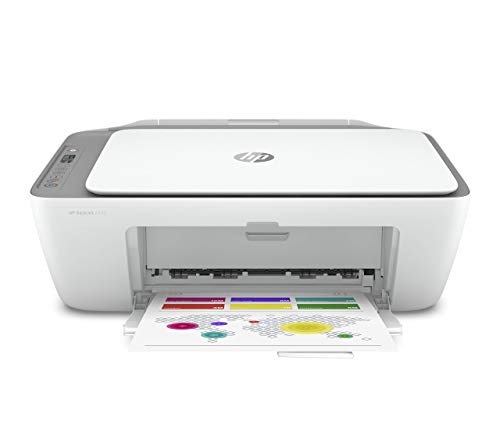
The HP DeskJet 2755 is a compact and affordable all-in-one printer perfect for home office environments. It features printing, copying, and scanning capabilities with user-friendly controls including an icon LCD display, and multiple LED indicators. Wireless connectivity allows printing from phones and tablets via Wi-Fi or USB, supporting various paper types including legal and letter sizes. This inkjet printer is compatible with Windows, macOS, and Chrome OS, offering reliable performance in a small footprint.
Canon imageCLASS MF3010 VP Wired Monochrome Laser Printer

The Canon imageCLASS MF3010 VP is a reliable monochrome multifunction laser printer designed for wired USB connection. It offers fast print speeds up to 19 pages per minute and performs high-quality scans up to 600 dpi. This device also includes an ID card copy feature, supporting easy duplication of identification cards and small documents. Compatible with multiple versions of Windows, Mac OS, and Linux (print only), it’s suitable for users seeking precise black-and-white printing efficiency.
Canon TS5320 Wireless All-in-One Printer Scanner Copier

The Canon TS5320 offers wireless printing, scanning, and copying with a compact and stylish design. Its 1.44-inch OLED display and LED status bar simplify monitoring printer status, even from a distance. This model supports Amazon Dash Replenishment for automatic ink refills. Using only two fine cartridges, the hybrid ink system delivers sharp text and vibrant photos, making it suitable for users who want easy maintenance and reliable quality.
HP LaserJet MFP M140w Wireless Monochrome All-in-One
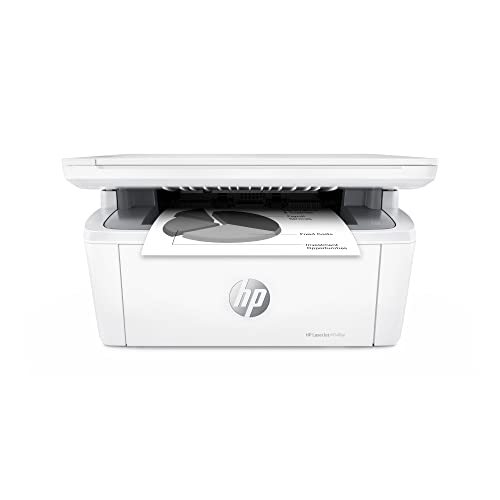
The HP LaserJet MFP M140w is a wireless monochrome multifunction printer combining printing, copying, and scanning in one compact device. It offers fast, high-quality black-and-white prints ideal for daily document needs. Wireless connectivity via Wi-Fi allows printing from mobile devices or laptops effortlessly through the HP Smart app. This model incorporates auto-on/off technology supporting energy savings and convenience for both home and office use.
Buying Guide for Choosing the Best Cheap Printer Copier Scanner
Selecting the right cheap multifunction printer depends on several key factors. Consider these aspects to ensure the best match for your needs:
Functions and Use Cases
Determine whether you require all four functions (print, copy, scan, fax) or just printing, copying, and scanning. Devices like the Canon PIXMA TR8620a include faxing, useful for office environments, while others may omit this feature to reduce costs.
Print Technology: Inkjet vs Laser
Inkjet printers provide vibrant photo printing and color outputs but usually have higher ink replacement costs. Laser printers are ideal for high-volume black-and-white printing, offering faster speeds and lower cost per page. Choose based on whether color printing or monochrome output is more important.
Connectivity Options
Wireless connectivity is essential for flexible printing from multiple devices such as phones, tablets, or laptops. Look for Wi-Fi, AirPrint, or integration with smart assistants like Alexa. USB or wired connections may suit stationary setups but reduce mobility.
Operating System Compatibility
Ensure the printer supports your computer’s OS, such as Windows, macOS, Linux, or Chrome OS. Most modern printers offer cross-platform compatibility, but double-check especially if you use less common systems.
Print Speed and Volume
Consider your typical document load. Devices range from around 7 to 35 pages per minute. Higher speeds benefit office users with frequent printing demands. Also, check recommended monthly volume to avoid overworking an entry-level printer.
Ink or Toner Management
Some printers support subscription services or smart reordering to avoid runouts. Others require manual replacement. Toner cartridges tend to have higher yields than ink cartridges, which impacts cost-efficiency over time.
Size and Design
Compact printers fit better in small workspaces or home offices. Designs with intuitive displays or color options can enhance usability and complement your setup.
Additional Features
Features such as automatic document feeders (ADF), duplex printing, and ID card copying add convenience but are usually available on higher-tier models. Weigh these extras against your budget and requirements.