Best Compact Laser Printer All-in-One for Small Offices and Businesses
Finding the best compact laser printer all-in-one model that fits your workspace and meets your printing needs is essential for small offices and home businesses. These multifunction devices combine printing, scanning, copying, and often faxing into one space-saving unit without compromising on speed or quality. Below is a summary table of top-rated compact laser printers followed by detailed reviews and a buying guide.
| Printer Model | Functions | Print Speed | Connectivity | Special Feature |
|---|---|---|---|---|
| Brother MFC-L2820DW | Print, Copy, Scan, Fax | Up to 36 ppm | Wireless Dual-Band, Ethernet, USB | Duplex Printing & 50-page ADF |
| Brother DCP-L2640DW | Print, Copy, Scan | Up to 36 ppm | Wireless Dual-Band, Ethernet, USB | Compact 3-in-1 with ADF |
| Brother MFC-L2900DW (Renewed) | Print, Copy, Scan, Fax | Up to 36 ppm | Wireless Dual-Band, Ethernet, USB | Single-pass Duplex Scanning |
| HP LaserJet Pro MFP 3101fdw | Print, Copy, Scan, Fax | Up to 35 ppm | Wi-Fi | Auto 2-sided Printing |
| HP LaserJet MFP M140w (Renewed) | Print, Copy, Scan | Fast Monochrome Printing | Wireless Wi-Fi | Auto-On/Off Technology |
Brother MFC-L2820DW Compact Monochrome Laser Printer

The Brother MFC-L2820DW is an ideal compact laser all-in-one printer tailored for small offices. It offers monochrome printing, copying, scanning, and faxing in a space-saving design. The unit prints at speeds up to 36 pages per minute, and scanning can be done at up to 23.6 ipm (black and white). Its 50-page auto document feeder streamlines multi-page jobs, helping enhance productivity.
The printer supports dual-band wireless (2.4GHz and 5GHz), Ethernet, and USB connectivity, ensuring versatile usage across different setups. Duplex printing is a key feature, allowing efficient double-sided output that saves paper and costs. Additionally, integration with Alexa adds voice-assisted convenience.
Brother DCP-L2640DW Wireless 3-in-1 Laser Printer

The Brother DCP-L2640DW is engineered to maximize productivity with its compact 3-in-1 functionality including printing, scanning, and copying. It delivers speedy monochrome prints at up to 36 ppm, matching the speed standards of its peer models, and scans up to 23.6 ipm.
This model also features a 50-page auto document feeder for efficient multi-page tasks and offers maximum connection flexibility with dual-band wireless, Ethernet, and USB interfaces. Ideal for busy small businesses, it balances compact size with high performance.
Brother MFC-L2900DW All-In-One Laser Printer (Renewed)

The Brother MFC-L2900DW handles business-grade monochrome printing, copying, scanning, and faxing efficiently while maintaining a compact footprint. It achieves print speeds of up to 36 ppm with an impressive single-pass duplex scanning capability on its 50-page ADF, optimized for double-sided multi-page documents.
Connectivity includes dual-band wireless, Ethernet, and USB options, along with support for the Brother Mobile Connect app allowing easy remote printer management. As a renewed item, it offers a cost-effective option for business users needing robust performance.
HP LaserJet Pro MFP 3101fdw Wireless Monochrome Printer

The HP LaserJet Pro MFP 3101fdw is tailored for small teams requiring professional-quality black and white output. It combines printing, scanning, copying, and faxing with a fast print speed of up to 35 ppm and features auto two-sided printing and an efficient auto document feeder.
This printer excels in connectivity via intelligent Wi-Fi that automatically finds the best connection ensuring uptime and productivity. The compact design allows placement in constrained office spaces while still supporting up to 7 users.
HP LaserJet MFP M140w Wireless Monochrome All-In-One Printer (Renewed)
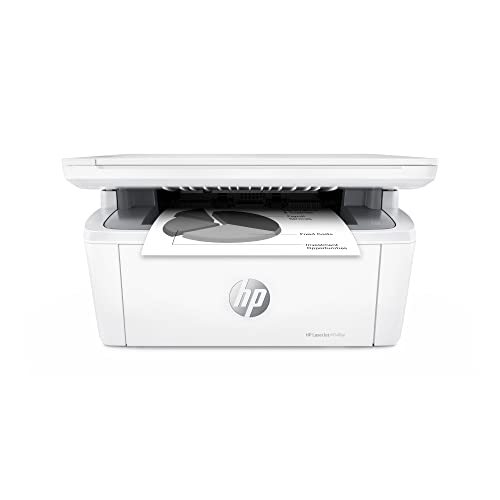
The HP LaserJet MFP M140w offers versatile printing, copying, and scanning in a space-saving white compact unit. Wireless Wi-Fi connectivity provides easy printing from phones, tablets, and laptops using HP’s mobile app options.
Its fast monochrome laser printing meets the demands of home offices or small business users looking for quality results with the added energy efficiency of auto-on/off technology. This renewed model presents a budget-friendly way to acquire dependable multi-function capabilities.
Buying Guide for Compact Laser Printer All-in-One Devices
When selecting a compact laser printer all-in-one, consider several key factors to ensure the device matches your work environment and document workflow:
1. Functionality Needed
- Decide whether you need all four standard functions (print, copy, scan, fax) or a simpler 3-in-1 without fax.
- For many small businesses, fax may be optional; home offices often prioritize scanning and copying alongside printing.
2. Print Speed and Volume
- Look for printers with speeds around 30-36 ppm for efficient document production during peak hours.
- Check duty cycle recommendations if your usage is heavy to avoid premature wear.
3. Connectivity Options
- Dual-band Wi-Fi (2.4GHz and 5GHz), Ethernet, and USB support provide flexibility for various office network setups.
- Mobile printing support through apps enhances convenience for device-agnostic environments.
4. Duplex and Auto Document Feeder (ADF)
- Automatic duplex (double-sided) printing and scanning helps reduce paper use and manual work.
- A 50-page ADF is common among top compact models to streamline multi-page jobs efficiently.
5. Size and Footprint
- Ensure the printer fits your desktop or designated office space without crowding but still allows easy access for paper reloading and maintenance.
6. Monochrome vs. Color
- Most compact laser all-in-ones offer monochrome printing for textual documents; opt for color if your work frequently involves charts or color graphics.
7. Brand Reliability and Support
- Brother and HP are leading brands known for durable laser printers and good support.
- Refurbished or renewed printers can offer savings but check for warranty and return policies.
8. Extra Features
- Voice assistant compatibility (e.g., Alexa) and mobile app controls add convenience.
- Look for models with energy-saving features like auto-on/off to reduce power costs.
Weighing these considerations against your specific office needs will help you choose the best compact laser printer all-in-one that balances performance, connectivity, and footprint to support your daily productivity.