Best Die Cut Sticker Printers for Creative DIY Projects and Custom Labels
If you are looking for the best die cut sticker printer to bring your creative ideas to life, you’ve come to the right place. This article covers top multifunctional sticker printers and cutting machines designed for DIY crafts, custom labels, and personalized gifts. Whether you need high-resolution printing, precise cutting, or an all-in-one solution, these devices offer versatile features for beginners and experienced crafters alike.
| Product | Brand | Key Feature |
|---|---|---|
| Liene PixCut S1 Color Sticker Printer & Cutting Machine | Liene | All-in-One thermal dye-sublimation printing and precise AI cutting |
| Cricut Joy Xtra Cutting Machine | Cricut | Compatible with home inkjet printer for print-then-cut designs |
| Brother ScanNCut SDX125E Electronic DIY Cutting Machine | Brother | Built-in scanner with automatic material sensor technology |
| Likcut Vinyl Cutter Machine Glee S501 (Blue) | LIKCUT | Intuitive software and Bluetooth 5.0 with front cover tool storage |
| Likcut Vinyl Cutter Machine Glee S501 (Pink Upgrade) | LIKCUT | Versatile cutting for 46+ materials with precise and clean cuts |
Liene PixCut S1 Color Sticker Printer & Cutting Machine

The Liene PixCut S1 is an all-in-one sticker maker that combines printing and cutting into a seamless workflow. Using thermal dye-sublimation technology, it delivers 300 DPI high-resolution prints with vibrant 16.7 million colors for photo-quality stickers and labels. Its innovative AI image extraction feature allows you to easily convert any photo or object into a perfectly cut sticker.
Through a user-friendly app, you can control all functions via Bluetooth from your smartphone, making the crafting process fast and intuitive. The PixCut S1 is perfect for DIY enthusiasts creating custom labels, gifts, and keepsakes, streamlining production with automated cutting precision that enhances every detail.
Cricut Joy Xtra Cutting Machine

The Cricut Joy Xtra is a compact cutting machine supporting over 50 materials including vinyl, iron-on, and cardstock. It works alongside your home inkjet printer to print then cut full-color designs, enabling the creation of detailed and vibrant stickers and decals.
Ideal for beginners and crafters with limited space, this machine offers precise cutting for intricate designs, making personalized project creation simple. Its Bluetooth connectivity enables seamless app control, making it a versatile addition to any creative workspace.
Brother ScanNCut SDX125E Electronic DIY Cutting Machine
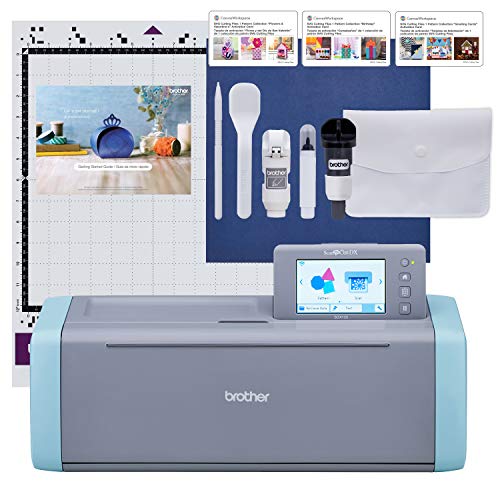
The Brother ScanNCut SDX125E stands out with its built-in scanner which lets you scan your own drawings and convert them into cut files. This enables you to cut custom stickers exactly as designed, even from printed images. It includes 682 built-in designs and fonts, enhancing creative options.
This machine uses automatic material sensor technology, removing the need for manual blade adjustments, which ensures efficient and accurate cutting. Its 5-inch touchscreen provides easy design customization and project management, making it suitable for various crafting levels.
Likcut Vinyl Cutter Machine Glee S501 (Blue)

The Likcut Glee S501 vinyl cutter is designed for ease of use with intuitive software, making it accessible for beginners. It offers stable Bluetooth 5.0 and USB 2.0 connectivity enabling quick and reliable connections without interference.
Its front cover doubles as storage for cutting tools and materials, helping keep your workspace tidy. This machine is practical for DIY projects, school assignments, and home décor crafting, supporting an engaging crafting experience with minimal setup.
Likcut Vinyl Cutter Machine Glee S501 (Pink Upgrade)

The upgraded Likcut Glee S501 Pink cutter expands versatility by supporting over 46 materials including vinyl, cardstock, iron-on transfers, and smart materials without mats. This provides broad opportunities for creative projects like scrapbooking, card making, and decorations.
It delivers precise and clean cuts, suitable for family crafting and school projects, and is known for its ease of use and vibrant appearance. The design encourages crafting with joy and confidence, making it a popular choice among DIY users.
Buying Guide for Die Cut Sticker Printers
Printing and Cutting Integration
When choosing a die cut sticker printer, consider whether you want an all-in-one device that prints and cuts in one step, like the Liene PixCut S1. This integration streamlines production and saves time. Alternatively, some cutting machines require a separate printer but support print-then-cut workflows.
Print Quality and Technology
High-resolution printing, such as 300 DPI thermal dye-sublimation, ensures vivid, true-to-life colors and sharp sticker details. The print technology affects durability and vibrancy, which is essential for professional-quality results.
Cutting Precision and Material Compatibility
Look for cutters that handle a wide variety of materials – vinyl, cardstock, iron-on transfers, and smart materials – to maximize project versatility. Automatic blade adjustment or sensor technology improves ease of use and cut accuracy.
Ease of Use and Connectivity
Bluetooth and USB connectivity options allow for flexible device control, often via smartphone apps or PC software. User-friendly interfaces, such as touchscreen displays and intuitive software, make crafting accessible whether you are a beginner or advanced user.
Portability and Storage
Compact designs and optional protective storage cases help transport your equipment safely and keep accessories organized. This is crucial for crafters on-the-go or those with limited workspace.
Software and Design Features
Consider devices with built-in design libraries, scanning capabilities, or AI-powered features like image extraction for custom sticker creation. These features reduce the learning curve and expand creative possibilities.
Project Type and Volume
Identify whether you need a machine for occasional small projects or frequent high-volume production. All-in-one printers work best for quick and varied DIY crafts, while dedicated cutters might be preferable for specialized or bulk tasks.