Best Dot Matrix Receipt Printers for Reliable POS and Kitchen Use
Dot matrix receipt printers remain a vital component in many businesses for printing receipts, kitchen orders, and labels due to their reliability and functionality in demanding environments. Below is a summary table highlighting the most dependable dot matrix receipt printers selected for diverse POS needs, featuring connectivity options, print speeds, and unique features.
| Product | Brand | Key Features |
|---|---|---|
| Epson TM-U220B Dot Matrix POS Printer | Epson | Ethernet & DK Port, 6.0 lps print speed, Auto-cutter, Compatible with iOS/Android |
| Epson TM-U220B Ethernet Receipt Printer | Epson | Ethernet connection, Auto cutter, Power supply included |
| Epson TM-U220B Compact MPOS Printer | Epson | Prints at 4 lines/sec, Two-color printing, Ethernet & DP port |
| Epson TM-U220D Dot Matrix Printer | Epson | No auto cutter, Ethernet connectivity, Power supply included |
| Epson TM-U295 Receipt Printer | Epson | Monochrome printing, reliable receipt output, dot matrix technology |
Epson TM-U220B Dot Matrix POS Printer

The Epson TM-U220B model is designed for high-speed, reliable receipts and kitchen order printing with print speeds up to 6.0 lines per second. It supports Ethernet and DK port connectivity for flexible integration in various POS systems. The printer is compatible with multiple platforms including iOS, Android, and Windows, making it mPOS-friendly. Additionally, it offers auto-cutter functionality and two-color printing to highlight offers or exceptions on receipts. DHCP-enabled, the printer facilitates easy network setup and management.
Epson TM-U220B Ethernet Receipt Printer
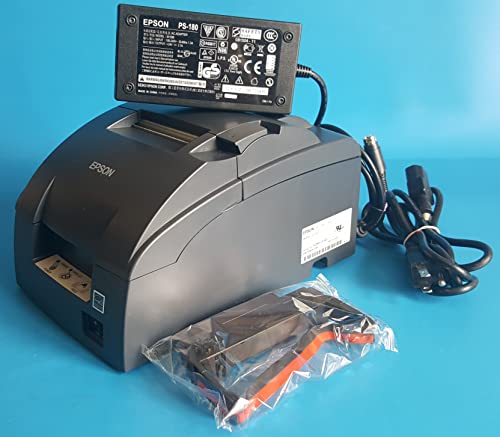
This Epson TM-U220B printer is a dependable choice for businesses requiring an Ethernet-connected printer with an auto cutter feature. It replaces models like the C31C514667 and includes a power supply, simplifying installation. Its dot matrix technology ensures durable printouts in kitchen and retail environments where reliability under frequent use is essential. The Ethernet connection offers stable and fast data communication within your POS setup.
Epson TM-U220B Compact MPOS Printer

The Epson TM-U220B version offers compact design with an emphasis on mobile POS compatibility. Featuring a DP port and Ethernet connectivity, it can be easily integrated with various platforms. This model prints at around 4 lines per second and supports two-color printing to visually differentiate important items on receipts. The printer’s auto-status monitoring and DHCP capabilities further enhance ease of use and network management.
Epson TM-U220D Dot Matrix Printer

The Epson TM-U220D is a sturdy dot matrix receipt printer designed without an auto cutter but with Ethernet connectivity and power supply included. This model is suited for environments where a simpler printer configuration is preferred without compromising print clarity or speed. It ensures consistent output quality for receipt printing needs in retail and hospitality.
Epson TM-U295 Receipt Printer

The Epson TM-U295 is a dependable alternative dot matrix printer ideal for monochrome receipt printing. Known for its durability and straightforward operation, it effectively meets front and back office printing requirements. Perfect for users who need reliable, no-frills receipt output from a dot matrix mechanism, this Epson model is a practical choice for retail environments.
Buying Guide For Dot Matrix Receipt Printers
Choosing the right dot matrix receipt printer is essential for smooth POS operations and efficient kitchen order printing. Here are key factors to consider:
1. Connectivity Options
Ethernet, USB, Serial, and DK Port are common interfaces for dot matrix printers. Ethernet connectivity is highly recommended for network stability in busy environments, while USB or serial may suit smaller setups. Make sure the printer supports the ports compatible with your POS system.
2. Print Speed and Quality
Print speed is often measured in lines per second (lps). Higher speeds, like 6.0 lps, enable faster transaction processing. Also, look for models that offer two-color printing to emphasize special offers or order notes.
3. Auto Cutter Functionality
An auto cutter reduces manual effort and speeds up receipt handling, improving overall checkout efficiency. If your workflow involves frequent printing, choose a model with this feature.
4. Compatibility with Mobile POS
For businesses using mobile devices, compatibility with iOS, Android, and Windows is vital. Look for mPOS-friendly printers that can connect seamlessly with mobile apps.
5. Durability and Maintenance
Dot matrix printers are chosen partly for their robustness in harsh environments like kitchens. Select printers that have good reliability records and offer easily replaceable parts such as ribbons and gears.
6. Additional Features
Features such as DHCP enabling for network ease, auto status monitoring, and support for multi-part receipts can make management and operations smoother.
Selecting from reputable brands like Epson ensures access to quality support and accessories, which is crucial for minimizing downtime in your business.