Best ID Badge Printers and Software for Professional Card Printing
Choosing the right ID badge printer and software can streamline your organization’s identification process, enhance security, and boost professionalism. Whether you need single-sided or dual-sided printing, beginner-friendly software, or a complete package including supplies, this guide covers the top solutions available. Below is a summary of the selected products with their key features for quick comparison.
| Product Name | Brand | Printing Type | Included Supplies | Compatibility |
|---|---|---|---|---|
| Cardholdir ID Easy Badges Solid 210 | Cardholdir ID | Single Sided | 250-print ribbon, 200 PVC cards, beginner software | PC & Mac |
| Bodno Magicard 400X Dual Sided | Bodno | Dual Sided | 300-print YMCKO ribbon, software | Windows & Mac |
| Bodno Magicard 300 Dual Sided | Bodno | Dual Sided | 300-print YMCKO ribbon, software | Windows & Mac |
| Bodno Magicard Pronto ID Card Printer | Bodno | Single Sided | 100-print ribbon, 100 PVC cards | Windows & Mac |
| Bodno Seaory S28 Dual Sided Printer with Camera | Bodno | Dual Sided | 300-print color ribbon, camera, software | Windows, Linux (Mac coming) |
Cardholdir ID Easy Badges Solid 210 Printer

The Cardholdir ID Easy Badges Solid 210 is a perfect starting point for businesses needing straightforward single-sided ID badge printing. This printer uses a hand-fed process to produce crisp, full-color cards at 300 dpi—a standard sufficient for most organizational needs.
Included is the Cardholdir beginner software, removing any need for expensive external design services. The package comes complete with a 250-print full-color ribbon and 200 PVC cards, allowing you to print your ID badges immediately on PCs or Macs.
Its simplicity combined with compatibility makes it an ideal choice for employee and student ID badge creation in a no-fuss setup.
Bodno Magicard 400X Dual Sided Printer

The Bodno Magicard 400X offers advanced dual-sided printing, making it ideal for organizations needing more comprehensive ID cards with information on both sides. It supports high-quality full-color printing backed by a 300-print YMCKO ribbon right out of the box.
This all-inclusive package also includes ID card design software compatible with Windows and Mac, streamlining your workflow. The Magicard 400X is notable for balancing professional-grade results with user-friendly operation.
Bodno Magicard 300 Dual Sided ID Printer

The Bodno Magicard 300 shares many features with the 400X but is geared toward those wanting dependable dual-sided printing with everything included for quick startup. It comes with a 300-print YMCKO ribbon, durable software, and produces vibrant full-color IDs.
Its compatibility with both PC and Mac makes it highly versatile. Users can create comprehensive ID cards with ease, supporting efficient printing workflows for events, organizations, or staffing needs requiring dual-sided cards.
Bodno Magicard Pronto ID Card Printer
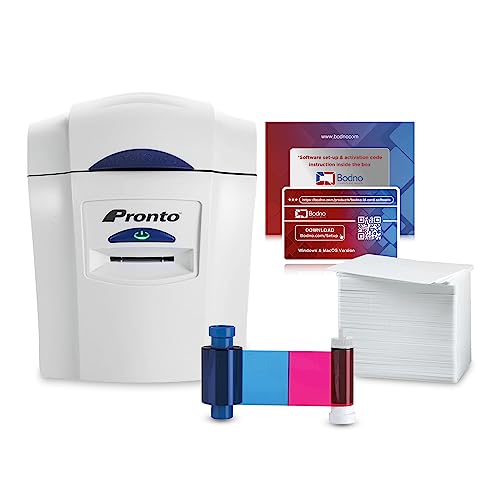
The Bodno Magicard Pronto is designed for users who require a reliable, easy-to-use single-sided ID card printer with everything needed packaged together. This unit includes a 100-print color ribbon and 100 durable white PVC cards, tailored to the printer for optimal quality.
Its user-friendly interface and hassle-free setup make it suitable for small to medium-scale ID issuance, supporting both Windows and Mac platforms. You can start printing professional ID badges immediately.
Bodno Seaory S28 Dual Sided Printer with Camera

The Bodno Seaory S28 is a comprehensive ID badge solution featuring dual-sided printing in a single pass at up to 300 x 1200 dpi resolution. It comes with full supplies and even a camera, making it ideal for instant ID creation requiring photos and high print quality.
This package supports Windows and Linux systems at present, with Mac compatibility expected soon, catering to diverse user environments. The Seaory S28 is designed to increase productivity without compromising image vibrancy or detail.
Buying Guide for ID Badge Printers and Software
Printing Type: Single vs. Dual Sided
Decide whether you need single or dual-sided printing. Single-sided printers like the Cardholdir ID Easy Badges Solid 210 and Bodno Magicard Pronto are excellent for basic ID badges where information fits on one side. Dual-sided models such as the Magicard 300 and 400X provide greater design flexibility, allowing for extra data, photos, or branding on the back.
Included Supplies and Software
Look for complete packages that include ribbons, PVC cards, and user-friendly software. This eliminates the hassle of sourcing materials separately and ensures all components are compatible. Ribbons are rated for a number of prints (e.g., 100, 250, 300), which is important for estimating ongoing supply needs.
Print Resolution and Quality
Most ID printers offer print resolution around 300 dpi, which is sufficient for clear text and vibrant images in ID badges. Higher resolutions or added features like the Seaory S28’s 300 x 1200 dpi may benefit organizations needing extremely detailed photos or barcodes.
Compatibility
Check that the printer and software are compatible with your operating system, whether Windows, Mac, or Linux. If you use multiple platforms in your organization, seek versatile products supporting these environments.
Usage Volume and Feeding System
Consider the volume of ID cards you plan to print. Printers like the Cardholdir and AlphaCard systems support manual feeding for low to moderate volumes, while others may offer batch feeding for increased efficiency.
Additional Features
Some systems, such as the Bodno Seaory S28, include extras like integrated cameras for photo capture during ID creation. Think about whether such features add value to your workflow or security requirements.
By weighing these factors against your organizational needs, you can select the best ID badge printer and software that offers a balance of performance, ease of use, and cost-effectiveness.