Best ID Badge Printer Machines for Professional-Quality Cards
Whether you need to print employee IDs, student badges, or membership cards, picking the right ID badge printer machine is essential for clear, durable results. This guide covers the best printers with included supplies and software to help you start printing immediately. Below is a summary table of the top-rated ID badge printers designed for various volumes and print requirements.
| Product | Brand | Printing Type | Printing Sides | Included Supplies |
|---|---|---|---|---|
| Bodno Seaory S25 Single Sided ID Card Printer & Complete Supplies Package | Bodno | Dye Sublimation (Manual Feed) | Single-Sided | Color ribbon for 100 prints |
| Bodno Magicard 400X Dual Sided ID Card Printer & Complete Supplies Package | Bodno | Dye Sublimation | Dual-Sided | 300-print YMCKO ribbon |
| Cardholdir ID Easy Badges Solid 210 ID Badge Printer with Beginner Software | Cardholdir ID | Direct to Card (DTC) | Single-Sided | 250-print full color ribbon, 200 PVC cards |
| Bodno Magicard 300 Dual Sided ID Card Printer & Complete Supplies Package | Bodno | Dye Sublimation | Dual-Sided | 300-print YMCKO ribbon |
| Bodno Magicard Pronto ID Card Printer & Complete Supplies Package | Bodno | Dye Sublimation | Single-Sided | 100-print YMCKO ribbon, 100 PVC cards |
Bodno Seaory S25 Single Sided ID Card Printer & Supplies

The Bodno Seaory S25 is a compact ID printer ideal for low-volume, single-sided printing tasks. It features a manual feed system, providing precise control by printing one card at a time. This model comes with an all-inclusive package featuring the Seaory 11011 color ribbon supporting 100 prints and user-friendly software with pre-made templates, included with a lifetime license. The software has an intuitive drag-and-drop interface, designed for ease even for beginners. This printer is well-suited for small offices or organizations seeking dependable, professional-quality ID cards with minimal setup.
Bodno Magicard 400X Dual Sided ID Card Printer & Supplies

The Bodno Magicard 400X is a versatile dual-sided ID card printer designed for medium to high-volume needs. It includes supplies such as a 300-print YMCKO ribbon to produce vibrant, full-color cards. Dual-sided printing helps create comprehensive card designs, like IDs with photos on one side and barcode or membership info on the back. The printer is compatible with both Windows and Mac operating systems, making it flexible for various environments. This package ensures you have everything necessary to start professional card printing immediately.
Cardholdir ID Easy Badges Solid 210 Badge Printer & Software

The Cardholdir ID Easy Badges Solid 210 offers a simple and efficient solution for printing single-sided employee or student ID badges. This kit includes beginner-friendly software to design badges without the need for graphic design experience. It contains a 250-print full color ribbon plus 200 PVC CR80 cards, sized like a standard driver’s license. As a direct-to-card printer with 300 dpi resolution, it meets the quality needs of most organizations. The manual feed and compatibility with PC and Mac give users straightforward control over badge production.
Bodno Magicard 300 Dual Sided ID Card Printer & Supplies

The Bodno Magicard 300 is another excellent dual-sided printer featuring the same technology as the Magicard 400X but designed for slightly different volume needs. It comes fully equipped with a 300-print YMCKO ribbon to create high-quality, vibrant cards on both sides. The printer supports dual-sided printing for detailed badge designs with professional finish. It works seamlessly on Windows and Mac platforms, catering well to businesses requiring flexible ID printing capabilities.
Bodno Magicard Pronto Single Sided ID Card Printer & Supplies
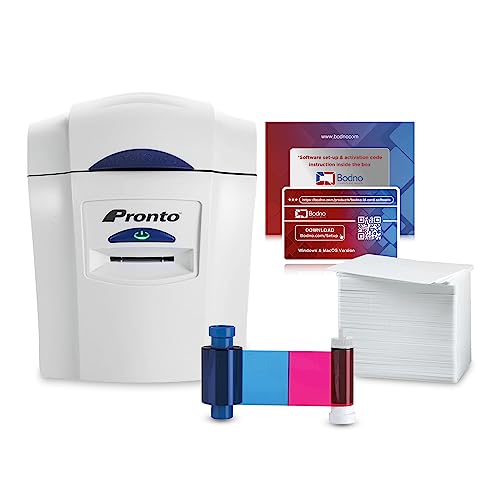
The Bodno Magicard Pronto is designed for straightforward, single-sided card printing with an easy startup process. It includes a 100-print YMCKO color ribbon and 100 durable PVC cards, so you can begin printing professional IDs right out of the box. The user-friendly features make this model suitable for small volume badge creation without sacrificing print quality.
Buying Guide for ID Badge Printer Machines
Choosing the right ID badge printer involves several important factors. Consider the following to ensure your purchase meets your specific needs:
Printing Volume and Speed
Evaluate how many badges you need to print regularly. Manual feed single-sided printers are best for low-volume or occasional use, offering precise control. For medium to high-volume needs, dual-sided printers with automatic feeding save time and effort by printing both sides in one pass.
Printing Technology
ID printers typically use either dye sublimation or direct to card (DTC) printing. Dye sublimation is common for vibrant, durable color cards and often included with ribbons. DTC printers provide sufficient resolution and can be more affordable. Match the printer to your desired card quality and durability requirements.
Single vs. Dual-Sided Printing
Dual-sided printing allows you to add security features, barcodes, and additional details on the back of your badges. If your ID cards require detailed information or branding on both sides, a dual-sided printer is essential. Single-sided printers are more budget-friendly and ideal for simpler cards.
Included Supplies and Software
Many products come bundled with ribbons, blank PVC cards, and badge design software. Choose a package that includes everything you need to start immediately. Software with pre-made templates and user-friendly design tools helps streamline badge creation without requiring graphic design expertise.
Operating System Compatibility
Ensure the ID badge printer supports your computer’s operating system. Most devices are compatible with Windows and increasingly Mac. Some models also support Linux. Verify compatibility to avoid technical difficulties.
Price and Value
While we avoid referencing specific pricing, balance your budget with required features. High-quality print output and software license longevity add value. All-inclusive packages save extra costs on supplies and software purchase.
By reviewing these factors alongside the product options, you can select the best ID badge printer machine tailored to your organization’s needs, ensuring professional-grade badges with ease.