Best Inkjet Printers With White Ink for Home and Office Use
Finding the best inkjet printer with white ink can be challenging, especially when seeking quality and versatility for creative projects or professional prints. While traditional inkjet printers primarily offer standard colors, some cutting-edge models and multifunction printers meet specialized printing needs with advanced features. Below is a summary table of top inkjet printers that excel in color printing performance, efficiency, and usability, ideal for home or office environments.
| Printer Model | Brand | Main Features |
|---|---|---|
| HP ENVY Inspire 7955e Wireless Color Inkjet Printer | HP | Print, scan, copy, mobile printing, 3-month Instant Ink trial, quality borderless photos |
| HP OfficeJet Pro 8125e All-in-One Color Inkjet Printer | HP | Print, scan, copy, ADF, duplex printing, fast color print speeds, robust wireless connection |
| HP Envy 6155e Wireless All-in-One Inkjet Printer | HP | Print, scan, copy, auto 2-sided printing, touchscreen, best for everyday home use |
| Canon MegaTank G3270 All-in-One Wireless Inkjet Printer | Canon | Wireless printing, scan, copy, ultra-high page yield, up to 2 years of ink included |
| Canon PIXMA TR7020a All-in-One Wireless Color Inkjet Printer | Canon | Duplex printing, mobile print, compact design, 2-cartridge ink system for quality |
HP ENVY Inspire 7955e Wireless Color Inkjet Printer

The HP ENVY Inspire 7955e is a versatile home inkjet printer offering print, scan, and copy functions with easy setup and mobile printing support. It is excellent for quality borderless photos and creative projects that demand precision. Print speeds reach up to 10 pages per minute (ppm) for color and 15 ppm for black. Activating HP+ adds smart features such as security enhancements and automatic updates, alongside a 3-month Instant Ink trial.
This printer supports multiple print sizes and ensures consistent output quality. Its ease of use and compatibility with HP’s Ink delivery service make it an attractive choice for users needing reliable performance.
HP OfficeJet Pro 8125e Wireless All-in-One Printer

The HP OfficeJet Pro 8125e suits home office environments where speed and multifunctionality are crucial. Offering print, scan, copy, and automatic duplex printing, it has a 225-sheet input tray and a 20-page auto document feeder (ADF) to enhance workflow efficiency.
With print speeds up to 10 ppm for color and 20 ppm for black, it handles business documents, reports, and presentations well. The dual-band Wi-Fi ensures reliable wireless connectivity by resolving common connection issues automatically, making this printer a valuable addition to busy workspaces.
HP Envy 6155e Wireless All-in-One Inkjet Printer

The HP Envy 6155e is designed for home use with everyday printing needs in mind. It offers print, scan, and copy capabilities with the convenience of auto 2-sided printing and a 35-sheet auto document feeder. Users benefit from a 100-sheet input tray and an intuitive 2.4-inch color touchscreen.
Print speeds are moderate, up to 7 ppm for color and 10 ppm for black. This model is ideal for families or individuals who require reliable photo printing, homework printing, and other daily tasks with straightforward controls.
Canon MegaTank G3270 All-in-One Wireless Inkjet Printer

The Canon MegaTank G3270 boasts a high-capacity ink tank system designed for heavy usage with up to 2 years of ink included. It supports wireless printing, scanning, and copying and offers an outstanding page yield of up to 6,000 black and white and 7,700 color pages per ink set.
This model reduces the hassle of ink replacements and is ideal for users needing extensive printing volume without frequent refills. Its efficient design and wireless capabilities make it suitable for home or small office environments.
Canon PIXMA TR7020a Wireless Color Inkjet Printer
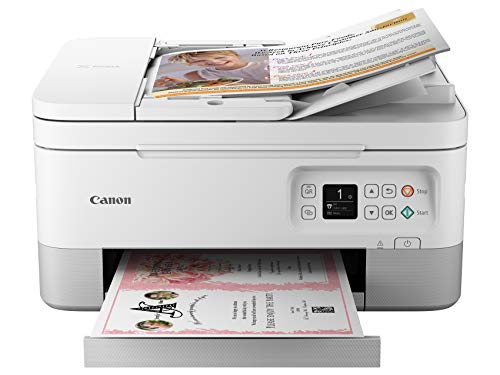
The Canon PIXMA TR7020a combines elegant, compact styling with practical features like duplex printing, mobile printing, and an auto document feeder. It uses a 2-cartridge fine hybrid ink system that balances photo and document print quality.
Its 1.44-inch OLED display and LED status bar help users monitor and navigate printer functions easily. This printer fits well in limited spaces while delivering reliable output quality for both photos and standard printing needs.
Buying Guide: Key Factors When Choosing an Inkjet Printer With White Ink
While inkjet printers with dedicated white ink are relatively rare on the mass market, selecting the right printer depends on several aspects to meet your specific requirements:
Printing Needs and Application
Identify whether you require white ink for creative projects such as printing on colored or dark media, or if your main focus is general printing with occasional specialty needs. Most standard inkjet printers do not include white ink cartridges, so consider specialty models or printers capable of third-party white ink refills if necessary.
Ink System and Cost Efficiency
Consider printers with high-capacity ink tanks like Canon’s MegaTank series or Epson’s EcoTank models that help reduce overall ink costs. Subscription ink replacement plans such as HP Instant Ink can also offer convenience but evaluate ongoing expenses carefully.
Print Quality and Speed
For photo enthusiasts or those wanting sharp prints with vibrant colors (including white highlights), look for models supporting fine hybrid ink systems and adequate DPI settings for crisp results. Print speed may matter if you handle larger document volumes.
Connectivity and Ease of Use
Wireless capabilities like Wi-Fi, mobile print compatibility, and easy-to-use touchscreen interfaces add to user convenience. Features such as automatic duplex printing and ADF can enhance productivity in busy home offices or businesses.
Compatibility with Specialty Inks
Since white ink is not standard in most consumer printers, ensure your chosen printer supports third-party white ink cartridges or specialty inks if white printing is critical. Professional or commercial inkjet printers sometimes offer these features but generally come at a higher price point.
By reviewing your printing volume, media types, and required ink options while balancing cost and convenience, you can find the optimum inkjet printer solution, even when white ink needs are part of your workflow.