Best Label Scanners and Printers for Efficient Barcode and Shipping Label Printing
Finding a reliable label scanner and printer can streamline your business operations, shipping, and organization tasks. Whether you need barcode labels, shipping tags, or personalized stickers, the perfect device should offer portability, compatibility, and advanced features. Below is a summary of top-rated label scanners and printers available on Amazon, designed to fit different needs and budgets.
| Product | Key Features | Brand |
|---|---|---|
| Phomemo M120 Label Maker | Portable thermal printer, prints up to 3,000 labels, multi-size support, powerful customization app | Phomemo |
| CLABEL Desk Bluetooth Label Printer 221D | Compact design, prints up to 2.28” wide, Bluetooth with custom app, versatile label types | CLABEL |
| KNAON Bluetooth Thermal Shipping Label Printer | Wireless Bluetooth and USB, compatible with major OS, supports 4×6 shipping labels, DIY templates | KNAON |
| NelkoGlobal Bluetooth Label Maker | Small and lightweight, prints various label shapes, wide app customization with 300+ templates | NelkoGlobal |
| Phomemo M220 Bluetooth Label Maker | Portable thermal printing, compatible with iOS/Android/Mac/Windows, free advanced editing app | Phomemo |
Phomemo M120 Portable Thermal Label Maker

The Phomemo M120 is an ultra-lightweight thermal label printer weighing just 200 grams. It can print up to 3,000 labels on a single charge and conserves battery life with an auto-sleep mode. Supporting label sizes between 20-50mm, it allows precise calibration for barcodes, QR codes, addresses, and more.
The device pairs with the “Print Master” app offering voice and image recognition features including OCR for easy text scanning and editing. With over 1,500 symbols, 200 templates, and 110 fonts in 20 languages, it is perfect for small businesses and home labeling needs requiring high customization.
CLABEL Desk Bluetooth Barcode Label Printer 221D

The CLABEL 221D barcode label printer features a compact and lightweight build, making it easy to place anywhere on a desk or transport. It supports labels from 0.78″ to 2.28″ wide, suitable for UPC barcodes, shipping, address, and jewelry labels.
It comes with the “clabel trade” app featuring over 300 icons, 58 templates, and 11 font styles. It supports barcode and QR code printing, Excel document printing, and image additions to labels. The app requires no registration and receives regular updates for improved functionality.
KNAON Bluetooth Thermal Shipping Label Printer

The KNAON Bluetooth Thermal Shipping Label Printer supports wireless printing via Bluetooth and USB connections across iOS, Android, Windows, macOS, ChromeOS, and Linux platforms. It requires the ‘FlashLabel Pro’ app for Bluetooth operations, ensuring seamless compatibility.
This printer excels in shipping label production with support for popular sizes including 4×6 inch labels. The app offers access to 3,000+ templates, 5,000+ icons, and 100+ fonts, facilitating diverse and creative label design for shipping, barcoding, price tags, and personalized stickers.
NelkoGlobal Bluetooth Label Maker

The NelkoGlobal M100 is a compact Bluetooth label maker slightly smaller than a smartphone. It prints labels sized 20x50mm including rectangular, circular, and transparent types, featuring self-adhesive backing for ease of use.
Compatible with Android, iOS, and PCs via USB, it uses the “Print Master” app to access over 300 templates, 1,200 icons, and hundreds of fonts and images. This variety equips users to label everything from office files to personal belongings efficiently with creative designs.
Phomemo M220 Bluetooth Portable Thermal Label Maker
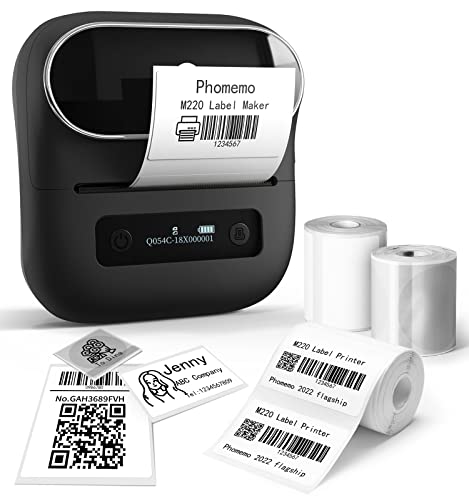
The Phomemo M220 offers a lightweight, portable design weighing only 400g. Using thermal technology requires no ink or toner, printing labels up to 3.14 inches wide with included rolls of different label sizes. It is not suitable for 4×6 shipping labels but supports barcode and QR code printing for various labeling tasks.
Highly compatible across iOS, Android, Windows, Mac, Linux, and Chromebook devices, the M220 pairs with the “Print Master” app. The app delivers features like barcode scanning, OCR, voice recognition, and comprehensive label customization suited for small businesses, home, and school use.
Buying Guide for Label Scanners and Printers
Label Size Compatibility
Different use cases require diverse label sizes. Consider whether you need to print small barcode labels, shipping labels (commonly 4×6 inches), or custom-sized stickers. Choose a printer that supports your requisite dimensions to avoid compatibility issues.
Connectivity Options
Bluetooth, USB, and wireless network connectivity are essential for versatility. Bluetooth is great for mobile and desktop use without cables, while USB offers reliable wired connections. Some advanced models feature wireless LAN or Ethernet for office integration.
Printing Technology and Ink Requirements
Thermal printers are popular for label printing as they require no ink or toner, reducing ongoing costs and maintenance. Direct thermal printers use heat-sensitive paper and work best in controlled environments due to label sensitivity to heat and light.
App and Software Features
Look for printers that come with dedicated apps or software that offer label design, barcode generation, QR code support, and template libraries. Features like OCR, voice recognition, and batch printing enhance productivity and customization.
Portability and Size
If you need a mobile label printer, consider the device’s size and weight. Compact, lightweight printers with rechargeable batteries facilitate on-the-go labeling, ideal for small businesses, retail, or fieldwork.
Print Quality and Speed
High print resolution (DPI) ensures clear barcodes and sharp text, which is critical for scanning accuracy. Also, consider printing speed especially if bulk label printing is a regular task.
Compatibility With Devices
Ensure the label printer supports your operating system—Windows, macOS, Android, iOS, Linux, or Chrome OS. Multi-platform compatibility avoids operational barriers and maximizes device usability.
Label Material Options
Consider what types of labels (paper, polyester, transparent, weather-resistant) the printer supports. Different applications may require durable or specialty labels suited for outdoor, shipping, or asset tagging.