Best Laser Printer CD Labels for Professional Media Organization
Finding high-quality laser printer CD labels is essential for anyone looking to create organized, professional, and visually appealing discs. Whether you’re labeling music collections, digital photo albums, or important data backups, these labels must be durable, easy to print, and compatible with your laser printer. Below is a summary table highlighting the top products selected for their performance, adhesive quality, and printable design options.
| Product Name | Brand | Label Type | Number of Labels | Compatibility |
|---|---|---|---|---|
| Avery Printable CD Labels, Matte White (5692) | Avery | Matte White, CD & Spine | 40 CD, 80 Spine | Laser Printers |
| Avery Printable Full-Face CD Labels, Matte White (8960) | Avery | Full-Face Matte | 40 Disc, 80 Spine | Laser & Inkjet |
| Avery CD Labels for Laser Printers, White (5698) | Avery | Matte White, CD & Spine | 100 Disc, 200 Spine | Laser Printers |
| Blank Labels CD/DVD Label, White Matte | Blank Labels | Matte White, CD & Spine | 20 Disc, 40 Spine | Laser & Inkjet |
| Online Labels 4.65 Inch Full-Face CD/DVD Labels | Online Labels | Full-Face Matte White | 200 Labels (100 Sheets) | Laser & Inkjet |
Avery Printable CD Labels Matte White (5692)

Avery’s Printable CD Labels in Matte White with permanent adhesive are ideal for laser printers, delivering a professional and clean look for CDs, DVDs, and other media discs. This pack includes 40 blank CD labels and 80 spine stickers, making it a great option for media projects requiring accurate organization and presentation. Avery offers easy-to-use design templates through their Design & Print Online platform, allowing users to quickly customize labels. The matte finish prevents glare while providing excellent print quality and durability.
Avery Full-Face Matte CD Labels, Laser/Inkjet (8960)

This full-face Avery label set features a larger printable surface area for a more impactful professional presentation. Compatible with both laser and inkjet printers, these labels come in a pack of 40 disc labels and 80 spine labels. The permanent adhesive ensures long-lasting application, suitable for DVDs and media discs. The included templates simplify creating personalized labels, making this a versatile choice for users needing both quality and customization options.
Avery CD Labels for Laser Printers White (5698)

Offering the largest quantity, this pack includes 100 disc labels and 200 spine labels designed specifically for laser printers. The white matte finish stops smudging, creating a neat and sharp appearance. These labels are perfect when needing bulk labeling for extensive media collections, providing reliable adhesion without compromising print quality. Avery’s platform supports effortless design, which is ideal for users wanting consistent and professional output.
Blank Labels CD/DVD White Matte Labels
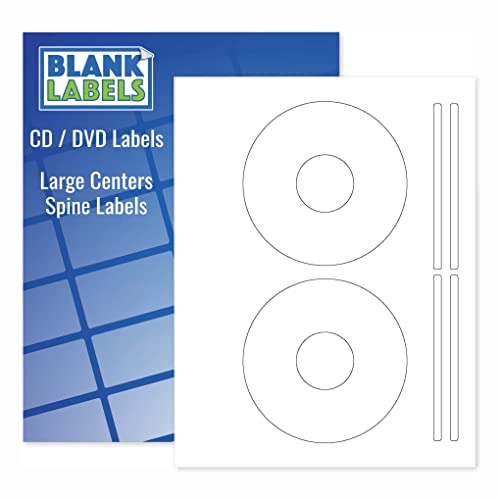
These CD/DVD labels from Blank Labels feature a matte white finish with a permanent adhesive tailored for CDs and DVDs but versatile enough for other surfaces such as paper, glass, or metal. Manufactured in the USA, these labels resist smudging and contain 20 disc labels and 40 spine labels per pack. They are compatible with both laser and inkjet printers, making them a flexible choice for small to mid-sized projects that require clear, durable labeling.
Online Labels Full-Face CD/DVD Labels & Spine

This pack offers 200 label sets across 100 sheets, compatible with laser and inkjet printers. Each label has a 4.65-inch diameter, covering the full face of the disc to create a polished look. The labels use smudge-proof matte white paper with permanent adhesive and a center hole dimension of 17mm. Buyers receive free design software activation and a protective storage case, adding convenient usability features for project storage and label designing.
Buying Guide for Laser Printer CD Labels
When choosing laser printer CD labels, understanding key factors ensures you select the best product for your needs.
Label Type and Finish
Choose between matte or glossy finishes. Matte finishes reduce glare and prevent smudging, ideal for professional yet subtle presentations. Glossy finishes offer vibrant colors but can show fingerprints easily.
Compatibility
Ensure your labels are compatible with laser printers. Some labels offer dual compatibility with inkjet printers, providing more flexibility.
Label Size and Shape
Full-face labels cover the entire disc surface, offering maximum design space. Standard labels cover smaller areas, typically leaving the disc center exposed. Consider your design needs before selecting.
Adhesive Quality
Look for labels with permanent and strong adhesives that last long without peeling off yet do not damage discs or devices during removal.
Quantity and Cost Efficiency
Bulk pack options save cost for large projects but may be excessive for occasional use. Estimate your usage volume to decide on the pack size that matches your needs.
Design Tools and Templates
Brands like Avery provide free online design tools and templates specifically for CD labels, easing the customization process and ensuring professional results.
Taking these considerations into account helps ensure you select laser printer CD labels that combine ease of use, durability, and aesthetic appeal for all your media labeling projects.