Best Membership Card Printer Machines for Professional ID Printing
Choosing the right membership card printer machine is essential for businesses, clubs, and organizations looking to produce high-quality ID and membership cards efficiently. This article covers top-rated printers available on Amazon, highlighting their features and what makes them suitable for various printing needs.
| Product | Brand | Key Features |
|---|---|---|
| Badgy100 Color Plastic Card Printer | Badgy | Color badges in 45 seconds, near-edge printing, easy setup |
| Bodno Magicard Pronto ID Card Printer & Complete Supplies Package | Bodno | Includes everything needed, easy to use, 100 PVC cards included |
| Cardholdir ID Easy Badges Solid 210 ID Badge Printer | Cardholdir ID | Beginners software, prints 200 cards, single-sided, 300 dpi |
| Bodno Magicard 400X Dual Sided ID Card Printer & Complete Supplies | Bodno | Dual-sided printing, 300-print ribbon included, all-in-one package |
| Bodno Seaory S25 Single Sided ID Card Printer & Supplies Package | Bodno | Manual feed, low volume use, lifetime license software included |
Badgy100 Color Plastic Card Printer
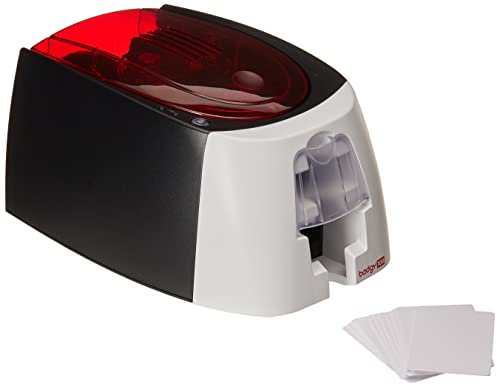
The Badgy100 delivers professional plastic ID cards using Mac and Windows ID design software. It features fast printing with a color badge ready in just 45 seconds. Users benefit from near-edge printing capabilities, providing a 1.35 mm (0.05″) print margin for cleaner results. Setup is straightforward for both beginners and advanced users. These features make the Badgy100 a reliable option for creating sharp, vibrant membership cards without a steep learning curve.
Bodno Magicard Pronto ID Card Printer & Complete Supplies Package
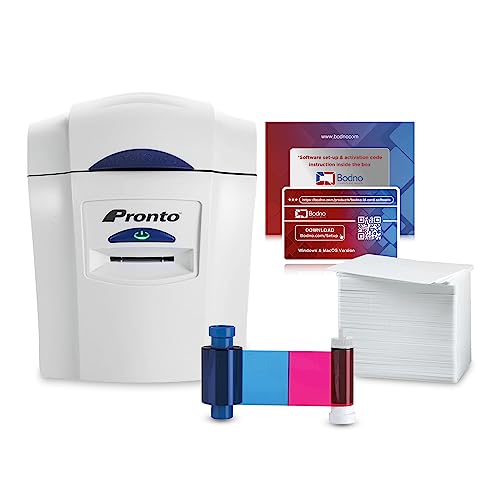
This Bodno Magicard Pronto package includes everything required to start printing professional-grade photo ID and membership cards right out of the box. It features a user-friendly printer with the MA100YMCKO color ribbon and 100 durable white PVC cards designed to work seamlessly with the printer. The all-inclusive nature and simplified setup make this bundle ideal for small to medium volume card printing needs.
Cardholdir ID Easy Badges Solid 210 ID Badge Printer

The Cardholdir ID Easy Badges Solid 210 is a simple hand-fed printer geared towards single-sided employee and student ID badges. It comes complete with beginner-friendly badge creation software, a 250-print full color ribbon, and 200 standard CR80 PVC cards. It offers 300 dpi print quality sufficient for most organizational needs and works on both PC and Mac platforms, making it a practical choice for educational or small business environments.
Bodno Magicard 400X Dual Sided ID Card Printer & Complete Supplies

The Bodno Magicard 400X offers dual-sided printing capabilities ideal for creating more detailed, comprehensive membership or ID cards. The package includes supplies and a 300-print YMCKO ribbon for vibrant, high-quality cards. Compatibility with Windows and Mac adds flexibility for various users. This printer suits organizations needing versatile, full-featured card printing solutions.
Bodno Seaory S25 Single Sided ID Card Printer & Supplies Package

This Bodno Seaory S25 is designed for low volume, precise printing with a manual feed system that prints one card at a time. The package comes with everything needed, including the Seaory 11011 color ribbon (100 prints). Its user-friendly software offers pre-made templates and drag-and-drop design features with a lifetime license, making it an excellent choice for small-scale printing tasks requiring professional-looking cards.
Buying Guide for Membership Card Printer Machines
When selecting the best membership card printer machine, several critical factors should be considered to ensure the printer meets your specific needs:
- Printing Type: Decide between single-sided or dual-sided printing based on the complexity of your card designs. Dual-sided printers allow for more detailed information on the back.
- Print Quality: Look for printers offering at least 300 dpi resolution to guarantee sharp images and text on cards, important for professional appearance.
- Speed and Volume: Consider your card printing volume—manual feed printers suit low volume while automated feeders and faster printing speeds are better for larger batches.
- Included Supplies: Packages including ribbons, blank PVC cards, and software can save cost and simplify setup, especially for first-time users.
- Software Compatibility: Check if the software supports both Windows and Mac platforms, and if it is user-friendly with customizable templates for easy card design.
- Card Size and Material: Verify the printer supports standard CR80 sized cards and works with durable plastic materials suited for long-term usage.
- Budget and Cost of Consumables: Besides the upfront cost, consider the expense of replacement ribbons and cards over time.
- Ease of Use: Machines with simple setup and intuitive interfaces reduce training time and errors during printing.
By evaluating these factors from multiple perspectives such as cost efficiency, quality, and operational ease, you can select a membership card printer that fits your organizational size and card printing needs effectively.