Best Mini Printers for Phone: Top Portable Photo and Sticker Printers
Mini printers for phones offer a convenient and fun way to print photos and stickers directly from your smartphone. Whether you want to capture memories on sticky-backed photo paper or create black-and-white thermal stickers, there’s a device that fits your need. Below is a summary table featuring some of the best mini printers available on Amazon, highlighting key features to help you choose the right one.
| Product | Printing Technology | Connectivity | Paper Type | Special Features |
|---|---|---|---|---|
| Canon Ivy 2 Mini Photo Printer | ZINK (Zero Ink Dye-based Crystals) | Bluetooth via Canon Mini Print App | Sticky-Back Photo Paper | No Ink Needed, Peel & Stick Prints |
| Print Pods Mini Printer (cudinham) | Thermal Inkless | Bluetooth via Tiny Print App | Adhesive & Thermal Paper Rolls (Black & White) | Customizable Sticker Sizes, OCR Functionality |
| KODAK Step Instant Smartphone Photo Printer | ZINK | Bluetooth & NFC | Sticky-Back ZINK Paper | Free Kodak App with Editing Suite |
| Kodak Mini 2 Retro Portable Photo Printer | 4PASS Color Printing with Laminating | Bluetooth via Kodak Photo Printer App | 2.1×3.4 in Photo Paper | Fingerprint Proof, Water Resistant Prints |
| TATTMUSE Portable Wireless Thermal Printer | Thermal Inkless | Bluetooth & USB-C | Thermal Paper (Black & White, Document Size Support) | Supports 8.5×11″ Paper, Mobile & Laptop Compatible |
Canon Ivy 2 Mini Photo Printer
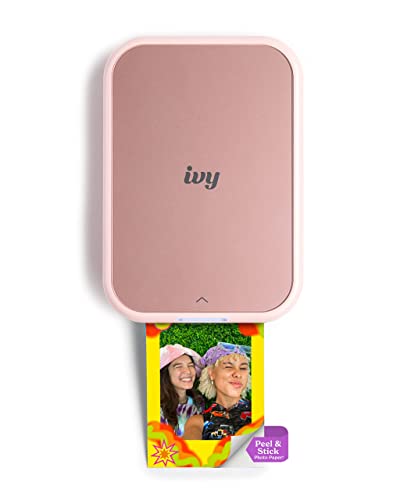
The Canon Ivy 2 Mini Photo Printer connects seamlessly to compatible iOS and Android devices through the Canon Mini Print App. Using innovative ZINK (Zero Ink) technology, this printer doesn’t require ink cartridges. Instead, it uses colorful dye-based crystals embedded inside special photo paper. The 2×3 inch prints include a peel & stick backing, allowing you to place your photos anywhere easily. Its compact size and inkless design make it perfect for on-the-go photo printing.
Print Pods Mini Sticker Printer by cudinham

The Print Pods Mini Printer relies on thermal inkless printing technology and comes with 10 rolls of paper (5 adhesive and 5 thermal). Printing is black and white only, ideal for labels, notes, flashcards, and creative sticker projects. The Tiny Print app simplifies Bluetooth connection and offers free zoom, drag, OCR capabilities, and rich templates. Its 1200mAh rechargeable battery supports long printing sessions, and the 200dpi resolution is gentle on the eyes and delivers crisp details.
KODAK Step Instant Smartphone Photo Printer

The KODAK Step Printer connects wirelessly via Bluetooth or NFC to your smartphone, supporting iOS and Android devices. It uses advanced ZINK technology for zero-ink, 2″x3″ sticky-back photo printing. The included Kodak App offers an extensive editing suite for collages, filters, customized text, and stickers. Prints are durable, resistant to moisture, rips, and smudges. This model is ideal for those wanting vibrant, personalized physical photos instantly.
Kodak Mini 2 Retro Portable Photo Printer

The Kodak Mini 2 Retro offers superior photo printing with its 4PASS color technology, layering colors and laminating the finish to make photos fingerprint-proof and water-resistant. It’s compact, weighing only 0.4 pounds, and connects via Bluetooth using the Kodak Photo Printer app. The prints measure 2.1×3.4 inches and are ideal for preserving high-quality snapshots on the go, perfect for travel, events, or home use.
TATTMUSE Wireless Inkless Thermal Printer

The TATTMUSE Portable Inkless Thermal Printer is designed for versatility beyond photos, capable of printing documents, receipts, and invoices with wireless Bluetooth connection to phones and tablets, or USB-C to laptops. It prints on thermal paper with crisp black and white output and supports sizes up to 8.5″ x 11″. The printer is lightweight and compact for travel or office use. Its inkless, thermal technology means no mess, no ink costs, and fuss-free maintenance.
Buying Guide for Mini Phone Printers
When selecting the best mini printer for your phone, consider the following factors to ensure it meets your needs:
- Printing Technology: Choose between ZINK (Zero Ink) for color photos with embedded dye crystals or thermal inkless printers specialized for black and white stickers and documents. ZINK printers provide vibrant color prints, while thermal printers are more versatile for labels and text.
- Print Size and Type: Verify print dimensions (commonly 2×3 inches) and whether the paper is sticky-backed for easy display. Some printers offer cuttable thermal paper rolls for customized label sizes.
- Connectivity Options: Bluetooth connectivity is standard for smartphone compatibility. NFC adds convenience for quick pairing. USB-C connection may be important if you want to print from laptops as well.
- Battery Life and Portability: Consider rechargeable battery capacity and the printer’s weight and size for mobile use. Long battery life supports prolonged printing sessions during travel.
- App and Editing Features: Look for printers with dedicated apps featuring editing tools like cropping, filters, stickers, and text to customize your photos before printing.
- Print Quality and Durability: Photo quality varies by printer technology; laminated or water-resistant prints are ideal for preserving memories. Thermal prints excel in sharp text and graphics.
- Cost of Consumables: Inkless printers reduce ongoing expenses since they don’t use ink cartridges. Evaluate the availability and cost of photo or thermal paper refills.
- Intended Use: For instant photo printing and creating keepsakes, ZINK models are best. For note-taking, labels, or business receipts, a thermal printer is more suitable.
By balancing these considerations, you can select a mini printer that effectively captures and preserves your favorite moments or supports your labeling and business needs with portability and ease.