Best Online Business Card Printers and Printable Business Card Papers
For anyone looking to create professional business cards from home or office, finding the best online business card printer or printable cardstock is essential. This guide features both dedicated ID and business card printers and blank card papers compatible with laser and inkjet printers. To help you decide, here is a summary of five top products for printing quality custom cards efficiently.
| Product | Type | Printer Compatibility | Key Feature |
|---|---|---|---|
| Avery Printable Business Cards with Sure Feed Technology (100 Cards) | Printable Cardstock | Inkjet | Sure Feed tech prevents misalignment & jams |
| Avery Printable Business Cards with Sure Feed Technology (250 Cards) | Printable Cardstock | Laser | Smooth edges with multiple precise cuts |
| AlphaCard Employee ID Card Printer System | ID Card Printer System | Standalone with software | Comes with printer, software & 100 blank PVC cards |
| Cardholdir ID Easy Badges Solid 210 Badge Printer | ID Badge Printer | PC & Mac compatible | Includes software, ribbons, and 200 PVC cards |
| Bodno Magicard 400X Dual Sided ID Card Printer | ID Card Printer | Windows & Mac | Dual-sided printing with full supplies package |
Avery Printable Business Cards with Sure Feed Technology, 100 Cards

Avery’s Printable Business Cards come in white cardstock paper designed specifically for inkjet printers. The Sure Feed Technology reduces printer jams and misalignments, ensuring every card prints reliably. These cards are 2″ x 3.5″, the standard business card size, and feature smooth, clean edges for a professional look. Their quality cardstock and precise cuts make them an excellent choice for anyone looking to customize their own business cards at home or office.
Avery Printable Business Cards with Sure Feed Technology, 250 Cards for Laser Printers
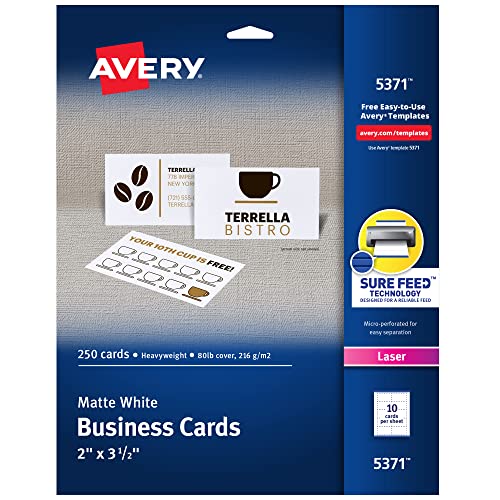
This Avery package contains 250 blank business cards suitable for laser printers, perfect for bulk printing and professional results. It offers precise cuts for smooth edges and includes the brand’s proprietary Sure Feed technology to prevent paper jams and misalignments. Free templates and customizable designs are available on Avery’s website, making it easy to design cards matching your exact business needs.
AlphaCard Employee ID Card Printer System with Software & Supplies
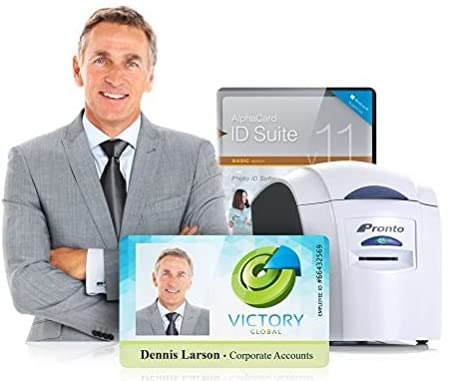
The AlphaCard Printer System is geared towards businesses requiring quality ID and business cards with a low volume output. The package includes Magicard Pronto ID Printer, AlphaCard ID design software, 100 blank PVC cards, and a 100 print ribbon. The printer uses a single-sided printing process with manual card feeding for dual-sided printing needs. This system suits small businesses wanting an all-in-one ID card printing solution.
Cardholdir ID Easy Badges Solid 210 Badge Printer with Starter Kit

The Solid 210 is a hand-fed ID badge printer ideal for producing single-sided ID or business cards. It comes with beginner-friendly Cardholdir ID software, 250 full-color print ribbon, and 200 PVC cards, capable of producing sharp 300 dpi prints. The printer supports both PC and Mac, making it a versatile yet straightforward choice for organizations needing colorful employee or event badges.
Bodno Magicard 400X Dual Sided ID Card Printer & Supplies Package

The Bodno Magicard 400X is a dual-sided ID printer complete with a 300-print YMCKO ribbon for vibrant, full-color cards. It offers comprehensive software compatibility with Windows and Mac platforms. This package provides everything required for professional card printing including supplies and software, ideal for users needing flexible, double-sided business or ID card solutions.
Buying Guide for Choosing the Best Online Business Card Printer
Selecting the right printer or printable card paper largely depends on your specific business card needs and printing volume. Here are key factors to consider before making a purchase:
- Type of Printing: Decide if you want to print cards using your existing inkjet or laser printer with blank cardstock, or if you require a dedicated ID card printer for PVC cards and more durable badges.
- Printing Volume: For low to medium volume, blank card sheets may suffice, whereas businesses needing frequent, professional ID card outputs benefit from a card printer system.
- Single vs Dual-Sided Printing: Consider if your cards need printing on one or both sides; some printers only print single-sided requiring manual reinsertion for double-sided output.
- Printer Compatibility: Ensure the cards or printer are compatible with your existing computer, printer type (laser or inkjet), and operating system (Windows or Mac).
- Design Software: Access to user-friendly design templates and software can simplify creating customized cards without the need for graphic designers.
- Card Material Quality: Depending on business needs, the choice between cardstock paper or PVC plastic cards affects durability and professional appearance.
- Edge Finishing and Card Size: Smooth, clean edges contribute to a polished look; standard business card size is usually 3.5″ x 2″.
By evaluating these aspects and referencing product features provided, you can select an online business card printing solution tailored to your brand and practical use.