Best Portable Photo Printers for Android: Instant, High-Quality Prints
Finding the best photo printer for Android means seeking devices that combine portability, ease of use, and excellent print quality. Whether capturing memories on the go or printing vibrant photos at home, these printers cater to diverse needs. Below is a summary table of the top portable photo printers reviewed, showcasing their unique features and what sets them apart.
| Printer | Printing Technology | Print Size | Connectivity | Special Features |
|---|---|---|---|---|
| Liene M100 4×6” Photo Printer | Thermal Dye Sublimation | 4×6 inches | Wi-Fi Hotspot | Includes 100 sheets & 3 cartridges, water/scratch resistant prints |
| Canon Ivy 2 Mini Photo Printer | ZINK (Zero Ink) | 2×3 inches | Bluetooth | Sticky-back prints, inkless printing technology |
| KODAK Dock ERA Plus 4PASS | 4PASS Dye Sublimation | 4×6 inches | Bluetooth, Dock Charging | Phone docking/charging, easy wireless printing |
| HP Sprocket Studio Plus 4×6″ Wireless | Dye Sublimation | 4×6 inches | Wi-Fi | Waterproof, smudge-proof photos, photo editing app |
| HPRT 4×6 Photo Printer with 108 Sheets | Dye Sublimation | 4×6 inches | Wi-Fi, Direct Wireless Link | 108 sheets included, Augmented Reality app features |
Liene M100 4×6” Photo Printer with 100 Sheets & 3 Cartridges

The Liene M100 is a user-friendly, portable 4×6 photo printer compatible with iPhone, Android, and PC. It comes with a full package including 100 photo papers and 3 color cartridges. Its thermal dye sublimation technology enables vibrant, full-color photos with a laminated finish that resists water, scratches, fingerprints, and fading. The built-in Wi-Fi hotspot provides a stable connection to your smartphone without external networks. Its minimalist magnetic design allows compact storage. The printer includes sealed cassettes to prevent dust contamination. It is ideal for printing durable, high-quality photos instantly from your Android device.
Canon Ivy 2 Mini Photo Printer with Sticky-Back Prints
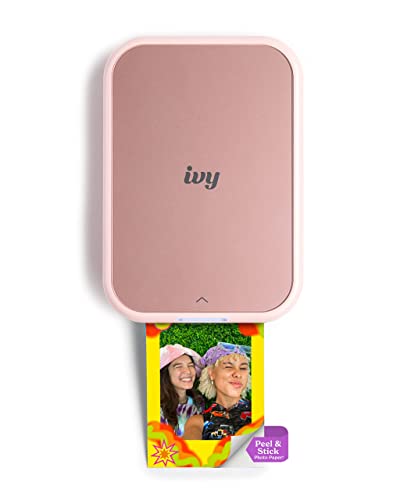
The Canon Ivy 2 Mini delivers photo printing with ZINK (Zero Ink) technology, which embeds color crystals within the paper itself, eliminating the need for ink cartridges. This compact device produces 2×3 inch sticky-back prints that can be easily placed anywhere. Using the Canon Mini Print app, users can print and customize photos directly from compatible iOS and Android devices. Its sticker backing supports creative use for scrapbooking, decorating, or sharing portable, vibrant images instantly. The device’s inkless design makes it low maintenance and convenient for on-the-go photo printing.
KODAK Dock ERA Plus 4PASS Instant Photo Printer Bundle

Kodak’s Dock ERA Plus is a versatile 4×6 inch photo printer that provides 4PASS dye sublimation printing for rich color accuracy. This printer enables easy docking and charging of smartphones while allowing instant photo printing at home or on the go. It supports wireless Bluetooth connectivity and is compatible with Android, iPhone, and iPad devices. The included value bundle offers a cost-effective way to print high-quality photos instantly and recharge your phone simultaneously, enhancing convenience during use.
HP Sprocket Studio Plus 4×6″ Wireless Instant Photo Printer

The HP Sprocket Studio Plus prints tear-resistant, smudge-proof, and waterproof 4×6 photos with a premium dye sublimation process. Designed for quick and efficient printing from iOS and Android smartphones via Wi-Fi, this printer produces photos that last for years. Use the accompanying editing app to personalize prints with stickers, frames, and filters before printing. This printer suits users seeking vibrant memories enhanced with creative options and instant printing performance in a compact size.
HPRT 4×6 Photo Printer with 108 Sheets & Dye Sublimation

HPRT’s 4×6 photo printer utilizes advanced dye sublimation technology to produce stunning 300dpi prints rich in color detail. The printer connects effortlessly with Android and iPhone devices via Wi-Fi or a direct wireless link through the HeyPhoto app. The package includes 108 sheets of premium photo paper. Its prints are waterproof, scratch-proof, and fade-proof, ideal for preserving precious moments. Unique to this printer is its Augmented Reality (AR) feature, which allows users to scan printed photos to replay original video clips, adding an interactive dimension to photo prints.
Buying Guide: Key Considerations for Android Photo Printers
Choosing the ideal photo printer for Android phones requires evaluating several factors beyond basic print capability:
1. Printing Technology
- Dye Sublimation: Produces vibrant, durable photos with laminated coatings resistant to water and scratches. Ideal for high-quality and lasting prints.
- ZINK (Zero Ink): Inkless technology using embedded dye crystals within photo paper. Convenient and low-maintenance but generally smaller print sizes with adhesive backing.
2. Print Size and Quality
Consider the typical print size you desire. Common sizes include 2×3 inches for portable mini prints and 4×6 inches for larger photos. Higher DPI resolutions lead to sharper and more detailed images.
3. Connectivity Options
- Wi-Fi Hotspot or Wi-Fi: Enables direct connection to the printer without external networks, offering stability and convenience.
- Bluetooth: Provides quick pairing and printing but may be limited by range or interference.
- Docking Options: Some printers double as a phone dock for charging.
4. Portability and Design
Photo printers vary from pocket-sized mini devices to larger 4×6 printers. Consider portability based on where and how you intend to use the printer—travel-friendly devices are typically compact and lightweight.
5. Consumables and Cost
Look at the included photo papers and cartridges to evaluate initial value. Printers using ink cartridges may incur higher running costs, while inkless printers require special paper. Bundles providing extra supplies often enhance value.
6. Additional Features
- Photo Editing Apps: Enhance photos with filters, stickers, text, and frames before printing for creative control.
- Sticky-back Prints: Useful for scrapbooking and decorating.
- Waterproof and Smudge-proof Prints: Ensure photographs remain pristine over time.
- Augmented Reality Capabilities: Allows videos or interactive content linked to printed photos for a modern twist.
7. Compatibility and Ease of Use
Ensure the printer supports Android devices and offers intuitive apps for printing. Features such as built-in hotspots or easy Bluetooth connectivity help streamline usage for casual users.