Best Playing Card Printer Machines for Professional and Business Use
Choosing the best playing card printer machine is essential for producing high-quality ID, membership, or customized plastic cards. This detailed guide reviews top Amazon selections designed for various needs, from beginners to advanced users. Included are models with single and dual-sided printing, compatible software, and complete supply packages for ease of setup.
| Product Name | Brand | Features |
|---|---|---|
| Badgy100 Color Plastic Card Printer | Badgy | Professional plastic ID cards, fast color badge printing, near-edge printing, easy setup |
| Bodno Magicard 400X Dual Sided ID Card Printer | Bodno | All-inclusive package, dual-sided printing, compatible with Windows and Mac |
| Cardholdir ID Easy Badges Solid 210 Single Sided Printer | Cardholdir ID | Complete supplies, beginner-friendly software, manual feed, 300 dpi print resolution |
| Bodno Seaory S25 Single Sided ID Card Printer | Bodno | Complete supplies package, manual feed, lifetime licensed software |
| Bodno Seaory S28 Dual Sided ID Card Printer | Bodno | All supplies included, one-pass dual-sided printing, high resolution, multi-OS support |
Badgy100 Color Plastic Card Printer
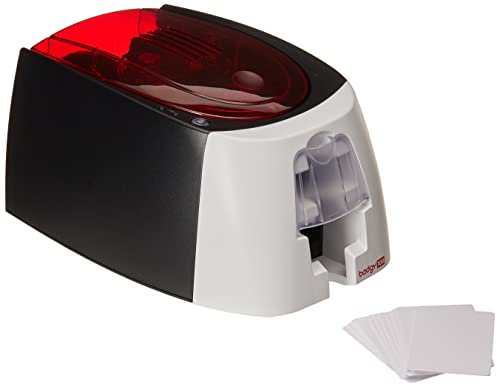
The Badgy100 Color Plastic Card Printer excels at producing professional-quality plastic ID cards with ease. It prints a full-color badge in just 45 seconds, making it suitable for quick card creation tasks. The printer supports near-edge printing with a minimal 1.35mm print margin, ensuring vibrant and clean images to the edge of the card. It includes user-friendly Mac and Windows ID design software, perfect for both beginners and advanced users.
This device is ideal for organizations needing fast, reliable single-sided prints without sacrificing image quality or setup complexity.
Bodno Magicard 400X Dual Sided ID Card Printer

The Bodno Magicard 400X features dual-sided printing capabilities for comprehensive card designs, making it perfect for advanced professional requirements. Its all-inclusive package comes with supplies such as a 300-print YMCKO ribbon, allowing for vibrant, full-color badge production right away.
This printer supports both Windows and Mac operating systems, enabling seamless integration into existing workflows. The dual-sided functionality enhances security and information capacity on IDs or membership cards, ideal for businesses requiring detailed card setups.
Cardholdir ID Easy Badges Solid 210 Single Sided Printer

The Cardholdir ID Easy Badges Solid 210 provides a simplified solution for single-sided card printing with everything included: beginner-friendly badge creation software, 250 full-color print ribbon, and 200 PVC cards. The 300 dpi print quality meets the majority of organizational needs with crisp, clear results.
Its manual card feeding process supports controlled printing of employee or student ID badges. With compatibility across PC and Mac, this printer is accessible for small organizations or educational institutions focusing on reliable single-sided card production.
Bodno Seaory S25 Single Sided ID Card Printer

The Bodno Seaory S25 offers an all-inclusive package with supplies, including the Seaory 11011 color ribbon for 100 prints. Its manual feed system emphasizes precision and ease for low-volume printing needs, printing one card at a time to reduce waste.
Included is lifetime licensed software with pre-designed templates and drag-and-drop design features, ideal for users seeking simplified but professional ID card manufacturing. This model fits small businesses or departments needing dependable single-sided card output.
Bodno Seaory S28 Dual Sided ID Card Printer

The Bodno Seaory S28 printer supports one-pass dual-sided card printing with resolutions up to 300 x 1200 dpi, enhancing printing speed and quality. Its all-inclusive package includes a 300-print color ribbon and integrates seamlessly with Windows and Linux systems, with Mac compatibility forthcoming.
This printer suits businesses requiring efficient production of vibrant, professional-grade ID cards for dual-sided applications such as memberships, access control, or loyalty cards.
Buying Guide for Playing Card Printer Machines
Printing Quality and Resolution
Choose printers with high dpi (dots per inch) for sharp images and vivid color depth. Resolutions around 300 dpi or higher are suitable for professional cards, while printers offering 300 x 1200 dpi deliver superior image clarity especially for photos and fine text.
Single vs. Dual-Sided Printing
Consider whether you need single-sided or dual-sided card printing. Dual-sided printers offer more design flexibility but tend to be pricier. Choose based on your requirement for adding information or enhancing security features on cards.
Included Supplies and Software
Many printers come with starter kits including ribbons, blank PVC cards, and design software. Full packages reduce initial setup hassles and ensure compatibility. Software ease-of-use affects productivity greatly – look for drag-and-drop interfaces and templates if you want quick card creation.
Compatibility and Connectivity
Ensure the printer supports your operating system (Windows, Mac, Linux). USB connection is standard but check if network printing is necessary for your environment. Some machines also offer Wi-Fi or Ethernet options.
Volume and Usage
Manual feed printers suit low-volume applications, printing cards one by one, increasing control but lowering speed. For larger volume needs, look for printers with card hoppers and automated feeders to handle batches efficiently without manual intervention.
Durability and Print Speed
Print speed varies; faster machines improve workflow but may come at higher cost. Also, assess card durability features such as overlay laminates for protected images and longer card lifespan.
Budget and Long-Term Cost
Balance initial investment with operating costs like ribbons and cards. Some printers require proprietary supplies, influencing long-term expenses. Choose models providing cost-effective consumables without sacrificing quality.