Best Portable Printers for Laptop Use and Travel Convenience
Finding a reliable portable printer compatible with laptops is essential for professionals and travelers who need quality printing on the go. This guide showcases top portable printers offering wireless connectivity, inkless technology, and easy compatibility with laptops and mobile devices. Below is a summary table highlighting key features of selected models to help you choose the best fit.
| Product | Brand | Printing Technology | Connectivity | Supported Paper Sizes | Weight |
|---|---|---|---|---|---|
| Portable Printers Wireless for Travel, Inkless Thermal Printer | TATTMUSE | Inkless Thermal | Bluetooth & USB-C | 8.5″ x 11″ US Letter & A4 | 1.5 lb |
| POLONO Portable Printer D810 Inkless Bluetooth Thermal Printer | POLONO | Inkless Thermal | Bluetooth & USB | US Letter & A4 | 1.17 lb |
| Canon PIXMA TR160 Wireless Portable Printer | Canon | Hybrid Ink System (Color) | Wi-Fi, App | Up to 8.5″ x 11″ | Lightweight |
| HP OfficeJet 250 All-in-One Portable Printer | HP | Inkjet | Wireless, USB | Standard Sizes | Compact |
| Canon PIXMA TR150 Wireless Portable Printer | Canon | Hybrid Ink System (Color) | Wi-Fi | Up to 8.5″ x 11″ | Lightweight |
TATTMUSE Portable Inkless Wireless Printer

The TATTMUSE Portable Wireless Printer weighs a mere 1.5 pounds and features a compact design measuring 10.39″ x 3.07″ x 1.77″. Its inkless thermal technology eliminates the need for ink, toner, or ribbons, allowing hassle-free black and white printing on specialized thermal paper. Compatible with laptops via USB-C and mobile devices via Bluetooth, it supports standard 8.5″ x 11″ US Letter and A4 paper sizes. Ideal for printing documents, receipts, receipts, and contracts on the go, this model excels in portability and operational cost efficiency. Note that laptop printing requires driver installation and a USB connection.
POLONO D810 Inkless Bluetooth Thermal Printer

The POLONO D810 printer weighs just 1.17 pounds, making it very travel-friendly. It uses advanced direct thermal technology for inkless printing on US Letter and A4 thermal paper. Wireless printing is supported via Bluetooth through the “Labelnize” app for iOS and Android devices, while PC users need a USB connection and driver installation. It is not compatible with Chromebooks. This printer is designed for black and white output, perfect for business documents and inventory lists. Paper size must be adjusted via a side switch for optimal printing results.
Canon PIXMA TR160 Wireless Portable Printer

The Canon PIXMA TR160 offers high-quality color and black text printing using a 5-Color Hybrid Ink System, including borderless photo prints up to 8.5″ x 11″. Its lightweight, compact design fits easily in bags, perfect for mobile use. Connectivity is versatile with Canon PRINT app support, Apple AirPrint, and Mopria Print Service enabling wireless printing from compatible smartphones, tablets, and laptops. It features a 50-sheet paper tray and a 1.44″ display for simple control, suitable for users needing full-color printing on the go.
HP OfficeJet 250 All-in-One Portable Printer
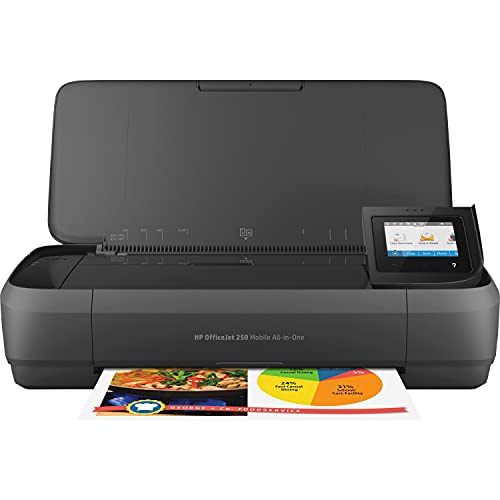
The HP OfficeJet 250 is a versatile all-in-one printer that prints, scans, and copies from virtually anywhere. It supports wireless and USB connections, including smartphone app integration for mobile printing. Its compact size makes it easy to carry in a backpack or briefcase, while the included battery promotes true portability. This model is suitable for users needing multifunction capability combined with color inkjet printing, providing convenience without sacrificing professional document quality.
Canon PIXMA TR150 Wireless Portable Printer

The Canon PIXMA TR150 combines portability with professional-quality printing in color and black text. It features Wi-Fi connectivity and a bright 1.44-inch monochrome OLED display for easy ink level monitoring and settings customization. Capable of printing documents and vibrant photos up to 8.5″ x 11″, this printer is ideal for remote office setups or travel. Its lightweight design enhances convenience without compromising print quality.
Buying Guide: Choosing the Best Portable Printer for Laptop Use
When selecting a portable printer compatible with your laptop, consider the following factors to ensure you pick the right device for your needs.
Printing Technology
- Inkless Thermal Printers: Utilize heat-sensitive paper, eliminating ink, toner, or ribbons. These models are lightweight, ideal for text and simple graphics, but only support black-and-white printing on thermal paper.
- Inkjet Printers: Offer color printing with high resolution, suitable for photos and detailed documents. Typically require ink cartridge replacements and may be bulkier.
Connectivity Options
- Bluetooth: Enables wireless printing from laptops, smartphones, and tablets, perfect for mobility.
- Wi-Fi: Allows connection to multiple devices on the same network remotely.
- USB: Direct wired connection, often necessary for laptop printing, especially where wireless is unsupported or for driver installation.
Supported Paper Sizes and Types
- Verify compatibility with standard sizes such as US Letter (8.5″ x 11″) or A4 to match your printing needs.
- Inkless printers require thermal paper, which differs significantly from regular copy paper and may affect print permanence.
Print Quality
- Check for resolution specifications; thermal printers typically provide up to 300 DPI which is clear for text and receipts.
- Inkjet printers often deliver higher resolution and color vibrancy required for photo printing and detailed graphics.
Portability and Battery Life
- Consider the printer’s size and weight to fit your travel or mobile work setup.
- Battery-powered printers provide unmatched freedom, while models needing constant power or USB connection limit portability.
Operating System Compatibility
- Ensure the printer supports your laptop’s OS (Windows, macOS, Linux) and any mobile devices you intend to use.
- Driver availability and app support enhance ease of use across devices.
Evaluating these aspects can steer you toward a portable printer that fits your workflow, whether you prioritize convenience, print quality, or multifunction versatility for your laptop-based printing needs.