Best Print Servers for USB Printers to Share and Manage Printing
Sharing USB printers across multiple devices can be a challenge without the right print server. This article highlights the best print servers for USB printers available on Amazon, focusing on wireless and wired options to suit different office and home environments. Explore devices that support multiple printers, easy setup, compatibility with major brands, and efficient print management. Below is a summary table with key features of the selected top print servers.
| Product Name | Brand | Key Features | Link |
|---|---|---|---|
| Xiiaozet Wireless Print Server for Sharing 3 USB Printers | Xiiaozet | Wireless LAN, supports 3 USB printers, RAW & IPP protocols, easy setup | View on Amazon |
| USB 2.0 Network Print Server with Type C Charging | CCYLEZ | Image printing support, Type C power, supports up to 256GB shared | View on Amazon |
| Wireless Print Server for Sharing 4 USB Printers | ASHATA | Supports 4 printers, wired/wireless/standalone modes, web management | View on Amazon |
| GOWENIC USB Printer Server with LAN & Wireless Extender | GOWENIC | LAN sharing, USB 2.0 compliant, wide device compatibility, no driver needed | View on Amazon |
| USB 2.0 Network Print Server LAN Compact Share Server | Sxhlseller | Image and text printing, multiple interfaces, supports multiple users | View on Amazon |
Xiiaozet Wireless Print Server for Sharing 3 USB Printers

The Xiiaozet Wireless Print Server enables sharing of up to 3 USB printers over a wireless LAN, allowing multiple users to print without physical connections. It supports both RAW and IPP protocols, covering most USB and network printers from popular brands such as HP, Brother, and Canon (except the Canon LBP series). The setup process is streamlined for ease; Windows users benefit from an installation tool for quick configuration. While it enhances office productivity by removing the need for USB switches, note that mobile printing and AirPrint are not supported.
USB 2.0 Network Print Server with Type C Charging

This CCYLEZ USB 2.0 Print Server supports efficient image and text printing and includes various interfaces for versatile connectivity, including a Type C power port, USB port for the printer, and a network cable interface. Designed with network sharing in mind, it can support up to 256GB for storage and printer sharing among multiple users, making it practical for small offices and shared workspaces. This plug-and-play device simplifies network printing without complex installation procedures.
Wireless Print Server for Sharing 4 USB Printers

The ASHATA Wireless Print Server can share up to 4 USB printers either wirelessly or via Ethernet, offering flexible connectivity options. Multiple operation modes, including wired, 2.4G wireless, and standalone, support different networking environments. The device features a simple web interface for configuration and management, making it suitable for home, retail, or warehouse settings where multiple computers need easy access to printers without location limitations.
GOWENIC USB Printer Server with LAN & Wireless Extender

The GOWENIC USB Printer Server connects via RJ45 LAN to provide USB printer sharing across multiple computers, minimizing cable clutter and cost. It adheres to USB 2.0 standards, ensuring compatibility with older USB 1.1 devices, and supports a variety of operating systems. No driver installation is required, and it works with several Epson and HP printers. The server supports only print functions, making it ideal for straightforward network printing tasks.
USB 2.0 Network Print Server LAN Compact Share Server
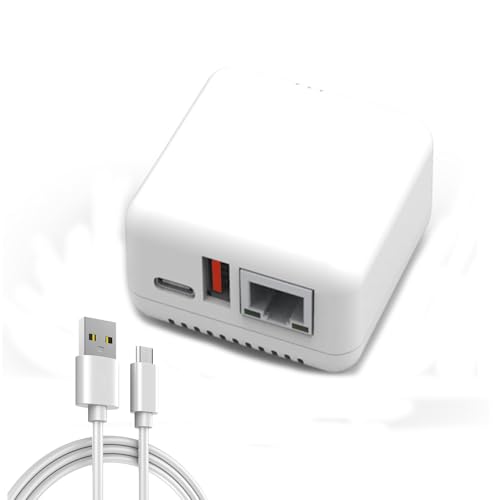
This compact Sxhlseller USB 2.0 Network Print Server enables image and text printing across a network with multiple users. It offers multiple interfaces such as a Type C power input, printer USB connection, and an RJ45 Ethernet port. Designed for easy sharing, it works with Android and Linux 3.4 systems, making it suitable for diverse environments needing network printer access without dedicated host computers.
Buying Guide for USB Printer Print Servers
Choosing the right print server for your USB printer involves several important considerations:
Number of Printers Supported
Determine if you need to share just one printer or multiple. Devices like the ASHATA model can handle up to 4 USB printers, while others are limited to sharing fewer devices.
Connectivity Options
Consider whether you need wireless support for flexibility or wired LAN connections for stability. Some print servers support both modes for versatile network environments.
Compatibility with Printer Brands and Protocols
Verify that the print server supports your printer’s protocol (RAW, IPP, TCP/IP) and is compatible with your brand to avoid connection issues. Almost all leading brands like HP, Brother, and Epson should be supported by good print servers.
Ease of Setup and Management
Look for devices with simple installation procedures or software assistance, along with user-friendly interface controls, possibly web-based for remote management.
Supported Operating Systems
Ensure the print server supports your network’s operating systems, whether Windows, Linux, or others, to guarantee interoperability.
Additional Features
- Plug-and-play capabilities reduce complexity.
- Multiple protocols and USB standards (USB 2.0/1.1 compatibility) provide broader device support.
- Power options such as USB Type C charging offer better usability and placement freedom.
By analyzing your environment and printing requirements based on these criteria, you can select a print server optimized for sharing your USB printers efficiently across your network.