Best Printers and Printable Cards for Business Card Printing
Creating professional business cards at home or in the office requires reliable printing supplies and compatible cards. This guide highlights top-quality printable business card options and printers designed to deliver crisp, clean, and durable cards that impress. Below is a summary table of select products suitable for various printers and business card projects, followed by detailed reviews. Whether you prefer inkjet or laser printers, perforated sheets or pre-cut cards, this selection covers key features and materials for business card printing success.
| Product | Brand | Cardstock Size | Printer Compatibility | Quantity |
|---|---|---|---|---|
| Avery Printable Business Cards with Sure Feed Technology | Avery | 2″ x 3.5″ | Inkjet | 100 Cards |
| Thick Business Cards Printable Paper, 10 Cards/Sheet | XXINMOH | 3.5″ x 2″ | Laser & Inkjet | 500 Cards |
| Avery Printable Business Cards with Sure Feed Technology | Avery | 2″ x 3.5″ | Laser | 250 Cards |
| Blank Business Card Paper for Printer | BEST PAPER GREETINGS | 3.5″ x 2″ | Inkjet & Laser | 1000 Cards |
| Thick Business Cards Printable Paper, 10 Cards/Sheet | YIZIQSS | 3.5″ x 2″ | Laser & Inkjet | 200 Cards |
Avery Printable Business Cards with Sure Feed Technology for Inkjet Printers

This set from Avery features 100 blank white business cards sized 2” x 3.5” designed specifically for inkjet printers. The Sure Feed technology ensures reliable card feeding through compatible printers, drastically reducing the risk of misalignments or paper jams, which is vital for maintaining a professional look. The cardstock offers smooth, clean edges due to multiple precise cuts, and the quality stock material provides a professional finish suitable for customizable prints. Ideal for users seeking dependable, crisp printing for personalized business cards.
Thick Business Cards 500 Printable Sheets for Laser & Inkjet Printers

The XXINMOH pack contains 500 standard 3.5 x 2 inch business cards printed on premium 250gsm heavyweight matte white cardstock. It supports double-sided printing and is compatible with both laser and inkjet printers. The set includes 50 perforated cards on 8.5 x 11-inch sheets allowing for easy, clean separation. This versatility caters to various business needs, whether for on-the-go exchanges or highly customized presentations. Perfect for professionals wanting robustness coupled with convenient customization options.
Avery Printable Business Cards with Sure Feed Technology for Laser Printers
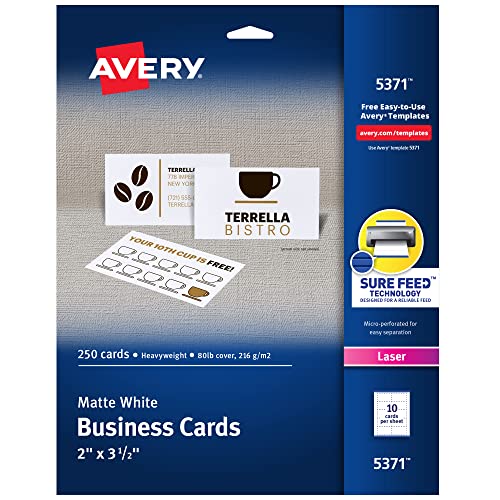
Designed for laser printers, this 250-pack of Avery blank business cards combines the benefits of Sure Feed technology with precise cuts for smooth edges. Each sheet supports the creation of professional business cards, calling cards, loyalty cards, and RSVP cards through free templates on Avery’s website. The quality cardstock ensures excellent print output while minimizing jams and misalignments, making it a dependable choice for busy offices printing high volumes of cards.
100 Pack Blank Business Card Paper for Inkjet and Laser Printers

The BEST PAPER GREETINGS 100-pack contains 1000 business cards sized 3.5” x 2” on white cardstock suitable for both inkjet and laser printers. The sheets feature pre-scored perforations for clean and effortless separation, perfect for distributing customized cards quickly. This pack is highly versatile, supporting a range of applications from standard business cards to thank-you notes or creative projects, ideal for those wanting bulk and flexibility in their printing.
Thick Business Cards 200 Printable Cardstock Sheets for Laser & Inkjet Printers

YIZIQSS offers a set of 200 thick printable business cards on premium 250gsm matte cardstock, sized at the industry standard 3.5″ x 2″. The pack includes 20 perforated sheets for quick separation and supports both laser and inkjet printers. Its design promotes effortless customization, allowing business owners to easily print logos, contact info, and other branding elements while maintaining a professional presentation. Suitable for smaller batches and varied business contexts.
Buying Guide for Selecting the Best Business Card Printer and Printable Cards
Printer Compatibility
Choosing business cards compatible with your printer type—inkjet or laser—is crucial. Inkjet-compatible cards handle liquid ink well, producing vibrant images but may require more drying time. Laser-compatible cardstock is heat-resistant and works with toner but may have a different finish. Look for explicitly stated compatibility to avoid jams or print quality issues.
Cardstock Weight and Thickness
Professional business cards typically use cardstock weighing between 250gsm and 300gsm. Heavier cardstocks provide durability, a premium feel, and resist warping. Check product specs for thickness; too thin and cards feel flimsy, too thick may cause printer jams.
Sheet Format: Precut vs. Perforated Sheets
Precut business cards are fully separated, which reduces manual cutting but require precise printer feeding. Perforated sheets allow you to print several cards and easily separate them afterward, offering flexibility and ease for home and office use. The choice depends on your workflow preferences.
Print Quality and Edge Finish
Look for technologies such as Avery’s Sure Feed to minimize misalignment and paper jams. Clean Edge or similar technologies enable cards to snap apart leaving smooth borders, enhancing presentation quality. Precise cuts reduce jagged edges and maintain professionalism.
Quantity and Price Considerations
Depending on your business needs, buying in bulk (500-1000 cards) can be cost-effective but ensure you can store and manage the inventory. Smaller packs allow for updated card designs or low-volume use without waste. Balance quantity with quality requirements and budget constraints.
Double-Sided Printing Capability
If you intend to print information or branding on both sides, select cardstock compatible with double-sided printing to avoid bleeding or smudges. Confirm the cardstock thickness and printer capability to handle two-sided prints effectively.
Customization and Design Templates
A good printable card set often comes with access to free design templates and software support, making it easier to create professional-looking layouts. Brands like Avery provide online design and print tools that enhance the printing experience.
Durability and Finish
Consider the finish—matte, glossy, or textured—depending on your branding style. Matte finishes reduce glare and feel smooth, while glossy finishes emphasize color vibrancy. Durability also depends on print conditions and paper quality.