If you’re shopping for a Mac-friendly desktop printer, you want reliable wireless connectivity, solid Mac compatibility, and easy setup. The following five printers are well-suited for macOS environments, whether you print documents, photos, or work papers. This guide highlights who each model is best for and why it stands out, with practical cautions to help you decide.
| Product | Best For | Key Benefit |
|---|---|---|
| HP OfficeJet Pro 8125 | Small Home Office | Fast color printing and duplex scanning |
| Canon PIXMA TR7120 | Home Users & Hybrid Work | All-in-one versatility with auto document feeder |
| Canon PIXMA TR160 | On-The-Go Printing | Portable with good color quality |
| HP DeskJet 4327 | Budget Everyday Printing | AI-assisted formatting for clean pages |
| Brother HL-L2405W | Small Teams, Monochrome | Reliable black-and-white laser with mobile print |
HP OfficeJet Pro 8125 Wireless All-in-One Color Inkjet Printer

The HP OfficeJet Pro 8125 is a strong candidate for a home office Mac setup. It supports color printing, scanning, copying, and duplex printing with an auto document feeder and a 225-sheet input tray. This model is best for users who frequently produce multi-page color documents, reports, and presentations, and want reliable color performance from a brand known for ease of use on Macs. A 3-month Instant Ink trial helps manage ongoing printing costs for busy weeks.
Who it’s best for: A small home office or entrepreneur who prints a mix of documents and color flyers, and wants straightforward Mac compatibility and hands-off ink management. Caution: Ink subscription changes after the trial period, which may affect monthly costs.
HP DeskJet 2923 Wireless All-in-One Color Inkjet Printer

The DeskJet 2923 is a compact all-in-one suitable for basic printing, scanning, and copying tasks. It offers mobile and wireless printing and a 60-sheet input tray, making it a practical choice for light home use. The AI-assisted formatting helps ensure clean layouts, particularly for everyday documents. This model is better for occasional printing rather than high-volume color jobs.
Who it’s best for: A student or light-duty user who wants an affordable, compact printer that works well with macOS for everyday tasks. Caution: Higher-volume tasks may require more robust ink management or a larger input tray.
Canon PIXMA TR7120 Wireless Color Inkjet Printer

The Canon PIXMA TR7120 is a versatile all-in-one that excels for home users and hybrid workers who print documents and photos. It features duplex printing, a 35-sheet auto document feeder, and a compact form factor. Its 2-cartridge hybrid ink system helps deliver sharp text and vibrant colors. Setup is straightforward with macOS and iOS devices.
Who it’s best for: Families or individuals who need reliable color printing and scanning in a single compact unit. Caution: The multi-function feature set may be more than needed for strictly black-and-white document workflows.
Canon PIXMA TR160 Wireless Portable Printer

The Canon PIXMA TR160 is a compact, portable printer ideal for on-the-go Mac users. It offers a 5-color hybrid ink system for good color accuracy and supports borderless prints. It pairs with mobile printing apps and common cloud services, making it a strong option for those who travel or work across locations. Limitations include smaller paper capacity and lower volume output compared with full-size deskside models.
Who it’s best for: Mac users who need a lightweight carry-along printer for travel, quick fieldwork, or temporary setups. Caution: Not the best choice for high-volume office printing.
HP Envy 6555e Wireless All-in-One Color Inkjet Printer
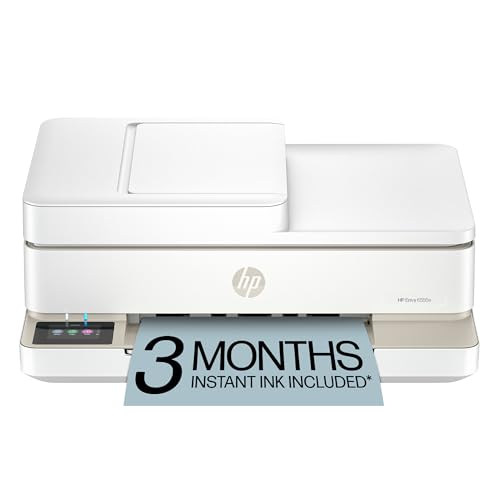
The HP Envy 6555e is designed for home use with color printing, copying, and scanning in a compact format. It supports auto duplex printing and includes a 3-month Instant Ink trial. The AI-assisted formatting helps ensure efficient page layouts for everyday schoolwork and household tasks. This model is best for mixed-use households that want smart printing features and good output quality.
Who it’s best for: Homes that print a mix of documents and photos and want an AI-assisted print flow. Caution: Higher-volume color printing could require more frequent ink replacements than some other models.
Buying Guide
What to consider when choosing a Mac-friendly printer
- Connection compatibility: Ensure AirPrint or macOS native support for seamless wireless printing from a Mac, iPhone, or iPad.
- Print volume: Choose a model that matches your typical monthly pages and color needs to avoid frequent ink or cartridge changes.
- Form factor: Desktop vs. portable; consider space constraints and whether you need a compact unit or a larger, faster printer for a small office.
- Paper handling: Look at input/output tray capacity and duplex printing to minimize reloading and improve workflow.
- Ink vs. laser: For color documents and photos, inkjets are common. For dense black-and-white text, a monochrome laser like the HL-L2405W is efficient.
- Maintenance and ink management: Some models offer Instant Ink or similar subscription plans—balance convenience with ongoing costs.
- Ease of use: Consider printers with intuitive apps and straightforward setup for Mac, iPhone, and iPad users.
Frequently Asked Questions
- Can these printers connect directly to a Mac via USB or Wi-Fi?
- Is a color inkjet better than a monochrome laser for a Mac home office?
- Do these printers require subscription services?
- What should I consider for portable Mac printing?
- Are auto document feeders necessary for home offices?
Yes. Most listed models support both USB and wireless connections, with macOS and iOS compatibility commonly including AirPrint for easy setup.
Color inkjets are typically better for color documents and photos, while monochrome lasers offer fast, crisp black text for reports and long documents.
Several include trial ink programs (like Instant Ink). After trials, ongoing costs depend on usage and ink plans you choose.
For travel, consider compact portable models with good color output and reliable wireless connectivity, plus easy app-based printing.
ADFs save time when scanning or copying multi-page documents. They’re especially useful for executives, students, and busy households.