Best Photo Printers for Vivid, High-Quality Prints
When it comes to printing photos at home or on the go, having a reliable, high-quality photo printer is essential. Whether you want compact portability or versatile all-in-one functionality, this guide covers some of the best photo printers available with features tailored to photo enthusiasts. Below is a summary table highlighting the selected products:
| Printer Model | Brand | Technology | Portability | Main Feature |
|---|---|---|---|---|
| Canon Ivy 2 Mini Photo Printer | Canon | ZINK (Zero Ink) | Yes | Sticky-back, inkless prints |
| Liene M100 4×6” Photo Printer | Liene | Thermal Dye Sublimation | Yes | Wi-Fi with 100 sheets + 3 cartridges |
| Canon PIXMA TR8620a | Canon | Inkjet | No | All-in-one with Alexa Integration |
| Kodak Mini 2 Retro 4PASS Portable Printer | Kodak | 4PASS Laminated Color | Yes | Pocket-sized, waterproof prints |
| Epson PictureMate PM-400 | Epson | Inkjet | Compact | Borderless 4″x6″ and 5″x7″ photos |
Canon Ivy 2 Mini Photo Printer – Portable and Inkless
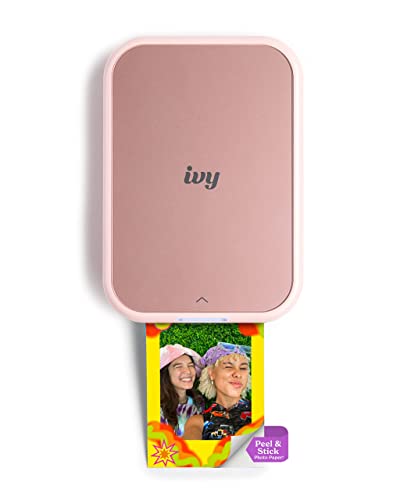
The Canon Ivy 2 Mini Photo Printer offers the convenience of printing photos directly from your iOS or Android smartphone without needing ink cartridges. Using innovative ZINK (Zero Ink) technology, the special paper contains embedded dye crystals activated by heat to produce vivid, full-color photos. Each print comes with a sticky-back feature, allowing effortless placement on any surface, making it ideal for scrapbooks, walls, or personalized stickers.
With the Canon Mini Print App, you can customize photos before printing, giving this compact device a great balance of portability and creative control. Its compact blush pink design makes it an easy companion for on-the-go photo printing needs.
Liene M100 4×6” Photo Printer With Wi-Fi Connectivity

The Liene M100 photo printer is a feature-rich, 4×6″ portable printer that supports printing from iPhone, Android, and PC. It includes 100 sheets of photo paper and 3 cartridges in the package, giving you plenty of prints to start with. Utilizing thermal dye sublimation technology, the printer offers bright, vibrant photos that are resistant to water, scratches, fingerprints, and fading.
Thanks to its built-in Wi-Fi hotspot, the Liene M100 ensures a stable smartphone connection without relying on external networks. The minimalist magnetic design provides easy storage options. This printer is well-suited for users who want high-quality 4×6 photos with the convenience of wireless technology and long-lasting prints.
Canon PIXMA TR8620a – All-In-One Photo Printing Solution

The Canon PIXMA TR8620a excels as an all-in-one device with printing, copying, scanning, and faxing capabilities. Beyond photo print quality, it supports wireless connectivity and integrates seamlessly with Alexa for added convenience. Alexa can notify you about ink levels and optionally place smart reorders, ensuring you never run out of supplies without subscriptions.
This printer is ideal for home office users who require versatility with quality photo printing. Its compact design and easy setup add to its appeal, making it a solid pick for users seeking multi-function productivity alongside photo printing.
Kodak Mini 2 Retro 4PASS Portable Photo Printer

The Kodak Mini 2 Retro printer is a compact, pocket-sized device designed for instant photo printing with superior durability. The 4PASS technology prints photos in multiple color layers and applies a laminating finish that makes them fingerprint proof and water resistant for lasting quality.
Bluetooth connectivity allows seamless pairing with Android and iOS devices via the Kodak Photo Printer app. Weighing only 0.4 pounds, it’s an excellent choice for travel, school activities, or casual use where portability and dependable photo quality matter.
Epson PictureMate PM-400 Compact Wireless Photo Printer

The Epson PictureMate PM-400 specializes in beautiful, borderless photo prints up to sizes 4″x6″ and 5″x7″. Designed for portability and high resolution, this wireless compact color printer is easy to use in the home or mobile settings.
It supports only Epson original cartridges, which guarantees consistency in print quality. Its ultra-compact design allows it to save space without sacrificing print quality or versatility. This makes it a top contender for users wanting crisp, professional-grade photos in a portable format.
Photo Printer Buying Guide: Key Considerations
Choosing the best photo printer tailored to your needs can be simplified by understanding several important criteria:
Printing Technology
- ZINK (Zero Ink) Printers: Produce full-color prints without ink cartridges, using heat-activated dye crystals embedded in the paper. Great for portability and ink-free convenience (e.g., Canon Ivy 2).
- Thermal Dye Sublimation: Prints photos with layers of dye that fuse onto the paper. Produces vibrant, durable, water-resistant images (e.g., Liene M100).
- 4PASS Laminated Printing: Layers of color plus lamination create fingerprint and water-resistant prints (e.g., Kodak Mini 2 Retro).
- Inkjet Printing: Versatile for documents and photos, often with multi-function features. Requires ink cartridges but can produce detailed, high-quality photo prints (e.g., Canon PIXMA TR8620a, Epson PictureMate PM-400).
Portability
- If you want to print photos on the go or while traveling, focus on compact, lightweight printers with smartphone connectivity and battery options.
- For home or office use, larger all-in-one printers offer additional functionality but are less portable.
Print Size and Quality
- Consider standard photo sizes you need: 2×3-inch sticky-back photos for scrapbooking vs 4×6 or 5×7 inch prints for framing.
- Look for printers that use fade-resistant or laminated technologies for long-lasting photo quality.
- Resolution and color fidelity vary; premium thermal and inkjet printers tend to produce sharper details and more accurate colors.
Connectivity and Ease of Use
- Wi-Fi or Bluetooth connectivity with dedicated smartphone apps streamline the printing process directly from your mobile device.
- Printers with built-in hotspots allow connection without relying on external Wi-Fi networks.
- All-in-one devices with fax, scan, and copy functions add versatility but may increase setup complexity.
Cost and Consumables
- Ink or paper costs impact ongoing expenses. Thermal and ZINK printers often have proprietary paper costs, while inkjet printers require ink cartridges or refillable tanks.
- Certain printers provide bundles with extra paper and cartridges to lower initial running costs.
By evaluating these factors according to your primary usage scenario and desired print outcomes, you can select the best photo printer to meet your creative and practical needs.