Best Photo Printers for High-Quality Picture Printing
Choosing the best printer that prints pictures is essential for capturing memories with vivid detail and lasting quality. This article highlights top photo printers that deliver exceptional color, convenience, and durability for printing directly from smartphones or computers. Below is a summary table featuring standout features of carefully selected printers ideal for photo enthusiasts.
| Printer | Brand | Key Features |
|---|---|---|
| Canon Ivy 2 Mini Photo Printer | Canon | Zero Ink Technology, Peel & Stick Photos, Smartphone App Compatibility |
| HP Sprocket Studio Plus | HP | Dye Sublimation, Waterproof Prints, Wireless 4×6″ Photos |
| Kodak Mini 2 Retro 4PASS | Kodak | Bluetooth Connectivity, Laminated Prints, Compact & Portable |
| Kodak Step Instant Smartphone Photo Printer | Kodak | Zero Ink, Sticky-Back Photos, Bluetooth & NFC, App Editing Suite |
| Liene 4×6” Photo Printer | Liene | Thermal Dye Sublimation, Built-in WiFi Hotspot, Water & Scratch Resistant |
Canon Ivy 2 Mini Photo Printer – Portable Zero Ink Printing
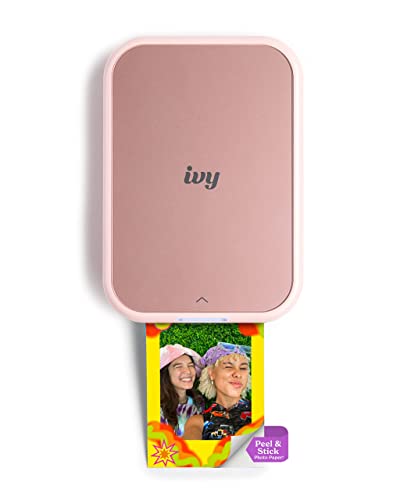
The Canon Ivy 2 Mini Photo Printer offers a portable and fun way to print photos directly from compatible iOS and Android devices using the Canon Mini Print App. Utilizing ZINK (Zero Ink) technology, it eliminates the need for ink cartridges, embedding colorful dye crystals in the photo paper. This technology provides vibrant, smudge-proof pictures that are sticky-backed, allowing easy placement on various surfaces. The compact size and lightweight design make it perfect for instant photo printing at social gatherings, travel, or at home.
HP Sprocket Studio Plus – Vibrant Wireless 4×6″ Photo Printer

The HP Sprocket Studio Plus is ideal for users wanting premium dye sublimation printing that creates 4×6-inch photos with vibrant colors. It features wireless Wi-Fi connectivity for quick, convenient direct printing from smartphones. Photos are printed on tear-resistant, smudge-proof, and waterproof paper to ensure durability. The HP editing app offers customization options, including stickers, frames, and filters for creative personalization before printing.
Kodak Mini 2 Retro 4PASS – Compact, Bluetooth Photo Printer

The Kodak Mini 2 Retro 4PASS uses layered color printing with a laminating process, which produces fingerprint-proof, water-resistant photos that last generations. This printer connects via Bluetooth to an Android or iOS device through the Kodak Photo Printer app. Its compact, lightweight design makes it extremely portable, perfect for both travel and casual home use. The 4PASS technology ensures superior photo quality with rich colors and detail.
Kodak Step Instant Smartphone Photo Printer – Sticky-Back 2×3” Prints

The Kodak Step Instant Photo Printer provides portable, zero-ink printing on 2” x 3” sticky-back ZINK paper. Compatible with iOS and Android via Bluetooth and NFC, it enables spontaneous printing of selfies, social media images, and portraits. Included is a comprehensive Kodak app for adding filters, borders, stickers, and text, allowing users to customize photos before printing. Its prints are moisture, rip, tear, and smudge resistant for long-lasting memories.
Liene 4×6” Photo Printer – Thermal Dye Sublimation with WiFi

The Liene 4×6” Photo Printer delivers high-quality, full-color photos by employing thermal dye sublimation technology, which deeply penetrates dye into the paper. Mylar protective layers guard prints against water, scratches, and fading. It has a user-friendly design with no paper jams, guided step-by-step printing via a dedicated app, and a built-in Wi-Fi hotspot, allowing direct connection without relying on home networks. This printer supports simultaneous connections up to five devices for seamless sharing.
Buying Guide: Key Factors When Selecting a Photo Printer
Selecting the ideal photo printer depends on your specific needs, print quality expectations, and usage environment. Here are essential aspects to consider:
- Print Quality & Technology: Dye sublimation and ZINK (Zero Ink) technologies offer vibrant, smudge-resistant prints. Dye sublimation typically provides superior image permanence and waterproofing.
- Print Size: Compact 2×3 inch stickers are ideal for scrapbooking, while 4×6 or larger sizes suit framing or albums. Choose based on how you intend to display your photos.
- Portability: If you need to print on-the-go, select lightweight, battery-operated mini printers with wireless connectivity. Desk models typically offer enhanced print speeds and larger paper capacity.
- Connectivity Options: Bluetooth, Wi-Fi, and NFC ease mobile device printing. Printers with dedicated apps allow photo editing and customization before printing.
- Ink and Paper Costs: Printers using ZINK technology do not require ink cartridges, reducing ongoing costs. Dye sublimation printers may require replacement ribbons or cartridges.
- Durability of Prints: For keepsakes, choose printers that produce waterproof, tear-resistant, and fingerprint-proof images.
- User Experience: Look for printers with an intuitive app interface, step-by-step guidance, and minimal paper handling errors.
Considering these features will help you find a photo printer that matches both your creative aspirations and practical requirements for lasting, vibrant pictures.