Best Printer to Router and USB Printer Cables for Stable Connections
Choosing the right cable for connecting your printer to a router or computer is essential for stable and fast printing. This guide presents the top cables designed for printers, scanners, and other USB-B devices. The selection includes USB-A to USB-B cables, USB-C compatible options, and Ethernet patch cables suitable for router connections. Below is a summary table to help you compare key features of the best printer cables available.
| Product | Brand | Length | Connection Type | Features |
|---|---|---|---|---|
| HP Printer Cable 6ft, Square USB A to USB B Cable | Bordsek | 6 Feet | USB-A to USB-B | High-speed USB 2.0, gold-plated connectors, wide compatibility |
| UGREEN USB A to USB B Printer Cable 5ft | UGREEN | 5 Feet | USB-A to USB-B | 480 Mbps transfer speed, backward compatible, wide device support |
| AINOPE Printer Cable 2-in-1 USB B to USB C/A, Nylon Braided | AINOPE | 6.6 Feet | USB-B to USB-A / USB-C | Versatile 2-in-1 design, high-speed data transfer, strong nylon braid |
| Amazon Basics RJ45 Cat 6 Ethernet Patch Cable 14 Foot | Amazon Basics | 14 Feet | RJ45 Ethernet | 1 Gbps speed, gold-plated connectors, reliable network connection |
| sweguard Printer Cable 10ft USB-A to USB-B Nylon Braided | sweguard | 10 Feet | USB-A to USB-B | High speed 480 Mbps transfer, gold-plated connectors, durable |
HP Printer Cable 6ft, USB A to USB B for Smooth Connection

The Bordsek HP Printer Cable offers a reliable USB 2.0 connection designed to link printers and scanners to computers or laptops. Its gold-plated connectors ensure corrosion resistance and a stable transfer of data. With a length of 6 feet, it provides flexibility and ease of setup in both home and office settings. Compatible with a variety of devices including Epson, Canon, Brother, and HP, this cable delivers a fast and more stable connection than Wi-Fi options.
UGREEN USB A to USB B Printer Cable 5ft High-Speed
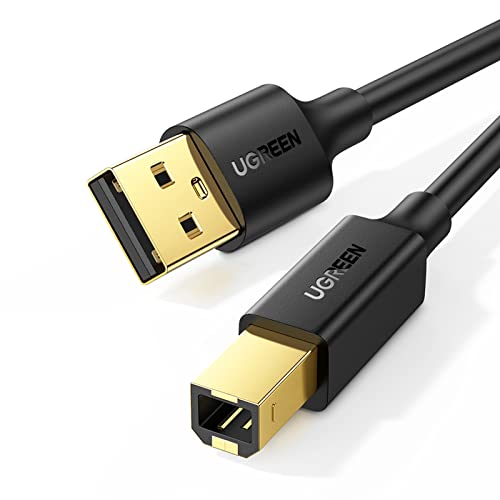
This UGREEN USB 2.0 cable offers up to 480 Mbps data transmission, backward compatible with lower speed USB versions. The 5-foot length suits most desktop or office setups. It supports multiple printer brands such as HP, Canon, Dell, Samsung, and Lexmark, making it a versatile choice. This cable excels in providing stable connectivity for printing and scanning tasks compared to wireless alternatives.
AINOPE 2-in-1 Printer USB B to USB C/A Cable 6.6FT

The AINOPE 2-in-1 cable innovatively combines USB-B to USB-A and USB-C connectivity. Nylon braided for durability, this 6.6-foot cable supports USB 2.0 high-speed transfers up to 480 Mbps. Its compatibility includes MacBook Pro, HP, Canon, Epson printers, and MIDI keyboards, catering to diverse user needs. This cable offers practical versatility for users who require connections to both modern USB-C and traditional USB-A ports.
Amazon Basics RJ45 Cat 6 Ethernet Patch Cable, 14 Foot

This Amazon Basics Cat 6 Ethernet cable supports 1 Gigabit per second transfer speeds for connecting printers directly to routers or network switches. Measuring 14 feet, it’s ideal for wired network setups to ensure fast, stable printing over a LAN. The gold-plated RJ45 connectors minimize interference and optimize signal quality, making it a strong alternative to wireless printer connections in office environments.
sweguard USB-A to USB-B Printer Cable 10ft Nylon Braided

The sweguard USB 2.0 printer cable boasts high-speed data transfer at 480 Mbps and universal compatibility with popular brands like HP, Canon, Dell, and Epson. Its 10-foot length offers additional reach, useful for various setups. Gold-plated connectors and braided nylon construction enhance durability and signal clarity, delivering reliable and tangle-free performance for extended printer or scanner connections.
Buying Guide for Printer to Router and USB Printer Cables
When selecting the best cable to connect your printer to a router or computer, several factors come into play to ensure efficient and uninterrupted printing:
- Type of Connection: Determine if your printer requires a USB-A to USB-B cable for direct computer connection or an Ethernet (RJ45 Cat 6) cable for network connectivity via a router. Ethernet cables are suitable for network printers accessible by multiple devices.
- Compatibility: Check the compatibility with your printer brand and model. Most USB-B cables support major brands like HP, Canon, Epson, Brother, and Dell. For multi-device compatibility, look for cables supporting both USB-A and USB-C outputs.
- Cable Length: Choose a cable length adequate to comfortably reach from your printer to the computer or router without tension. Common lengths range from 5 to 16 feet, with longer cables offering more flexibility but potentially more signal attenuation.
- Data Transfer Speed: Opt for cables supporting USB 2.0 or higher, which provide transfer rates up to 480 Mbps — beneficial to reduce printing delays. For Ethernet, Cat 6 cables offer up to 1 Gbps that improve throughput for network printing.
- Build Quality: Prioritize cables with gold-plated connectors and shielding to reduce interference and corrosion. Nylon braided cables improve strength and prevent tangling, extending the cable’s lifespan.
- Plug and Play & Stability: Look for cables that require no additional drivers and offer stable connectivity compared to wireless options, which can suffer from signal drops or delays, especially in offices with many devices.
- Versatility: Some cables offer dual connectors (USB-C and USB-A) enhancing compatibility with both modern laptops and traditional desktop computers, reducing the need for multiple cables.
Careful consideration of these aspects ensures that you select a printer to router or USB printer cable that meets your printing needs with long-term reliability and minimal connectivity issues.