Best Printers With Envelope Tray for Efficient Office Use
Finding the best printer with an envelope tray can significantly improve your office workflow, especially when handling mailings or specialty media. These printers offer versatile paper handling, high print speeds, and robust connectivity features. Below is a summary table of the top printers with envelope trays available on Amazon, focusing on business and home office needs.
| Printer Model | Type | Paper Capacity | Print Speed | Wireless | Envelope Tray |
|---|---|---|---|---|---|
| Brother HL-L5210DWT | Monochrome Laser | 250+520+100 sheets | Up to 48 ppm | Yes | 100-sheet multipurpose tray |
| Brother HL-L3220CDW | Color Laser | 250 sheets + manual feed | 19 ppm | Yes | manual feed slot |
| Brother HL-L6210DWT | Monochrome Laser | 2x 520 + 100 sheets | Not Specified | Yes | 100-sheet multipurpose tray |
| Brother MFC-J5340DW | Color Inkjet All-in-One | 250 sheets + 50-page ADF | Up to 28 ppm | Yes | Multipurpose tray |
| Brother HLL8360CDWT | Color Laser | 250+500 + 50 sheets | Up to 33 ppm | Yes | 50-sheet multipurpose tray |
Brother HL-L5210DWT Monochrome Laser Printer With Dual Trays

The Brother HL-L5210DWT offers fast printing speeds up to 48 pages per minute, making it an excellent choice for busy office environments. It features dual paper trays that include a 250-sheet main tray, a 520-sheet secondary tray, and a 100-sheet multipurpose tray ideal for envelopes or custom media. Its total paper capacity can expand up to 1,390 sheets with optional trays.
This monochrome laser printer supports both wireless and gigabit Ethernet networking for flexible connectivity options. The device also facilitates cost-efficient printing using Brother’s high-yield toner cartridges, reducing the need for frequent replacements.
Brother HL-L3220CDW Wireless Color Laser Printer

The Brother HL-L3220CDW offers professional quality color laser printing at an impressive speed of 19 pages per minute. It’s designed for home offices or small businesses seeking vibrant graphics and crisp text output. This printer includes a 250-sheet paper tray and a manual feed slot for envelopes or specialty media.
Wireless connectivity lets you print effortlessly from laptops, smartphones, and tablets, and built-in security protocols protect sensitive documents. Although it only has one main tray, the manual feed adds versatility for handling different media types.
Brother HL-L6210DWT With Dual Paper Trays and Wireless Networking

The Brother HL-L6210DWT enhances efficiency with its dual 520-sheet paper trays, complemented by a 100-sheet multipurpose tray ideal for envelopes or custom media. Total paper capacity expands up to 1,660 sheets with an optional tray, reducing downtime for refills.
It offers dual-band wireless and gigabit Ethernet connectivity for networked environments. The printer employs ultra high-yield toner cartridges, supporting up to 18,000 pages to lower operating costs, and comes preloaded with a 3,000-page cartridge for immediate use.
Brother MFC-J5340DW Professional Wireless Color Inkjet Printer

The Brother MFC-J5340DW is a versatile all-in-one inkjet printer supporting up to 11″ x 17″ ledger-size printing. It delivers up to 28 pages per minute in both black and color with Brother’s MAXIDRIVE technology, making it suitable for presentations and proposals.
Paper handling includes a 250-sheet tray and a 50-page automatic document feeder (ADF), enabling smooth workflows. Wireless and cloud-ready printing make it compatible with mobile devices and voice-controlled assistants such as Alexa.
Brother HLL8360CDWT Business Color Laser Printer With Dual Trays
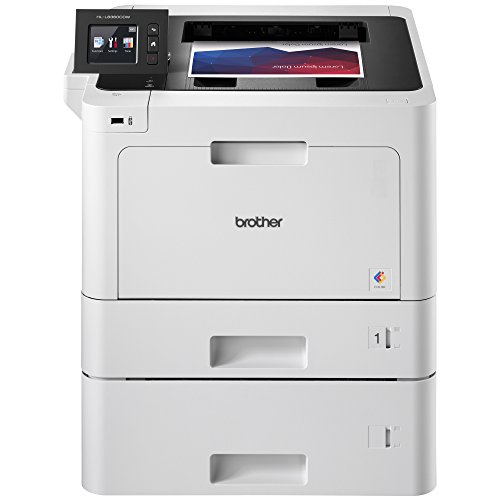
The Brother HLL8360CDWT delivers high-quality color prints at speeds up to 33 pages per minute. It supports dual paper trays—a 250-sheet standard tray and a 500-sheet additional tray—plus a 50-sheet multipurpose tray designed for envelopes and specialty media.
Its connectivity options include wireless and gigabit Ethernet, with mobile device compatibility through AirPrint, Brother iPrint&Scan, Mopria, and Wi-Fi Direct. This printer suits busy workgroups requiring high-capacity and flexible media handling.
Buying Guide: How To Choose The Best Printer With Envelope Tray
Choosing the right printer with an envelope tray involves evaluating several key factors to match your printing needs efficiently.
1. Paper Handling Capacity and Tray Configuration
Printers with multiple trays, including a dedicated envelope or multipurpose tray, help accommodate various paper sizes without manual switching. Consider the total paper capacity, especially if you print large volumes regularly.
2. Print Technology and Speed
Laser printers usually offer faster printing speeds and sharper text, ideal for monochrome or color business documents. Inkjet printers are better for photo-quality color and specialized prints but often at slower speeds. Choose speed specifications that fit your workload.
3. Connectivity Options
Wireless networking, Ethernet ports, and compatibility with mobile devices and cloud services add flexibility for home or office setups. Features like Wi-Fi Direct or NFC allow quick device connection without a network.
4. Cost Efficiency
Look for printers that support high-yield toner or ink cartridges to reduce operating costs. Some models come with high-capacity cartridges included, minimizing frequent replacements and downtime.
5. Additional Functionalities
All-in-one printers provide scanning, copying, and faxing, enhancing office productivity. Features like automatic duplex printing and automatic document feeders (ADF) further streamline tasks involving envelopes and multi-page documents.
Assessing these parameters ensures you select a printer with an envelope tray tailored to your document output, media flexibility, and efficiency needs.