Best Smart ID Card Printers and Supplies for Professional Badge Printing
Choosing the right smart ID card printer and compatible supplies is essential for businesses, schools, or organizations that require secure, high-quality photo ID badges. This article features top-rated smart ID card printers and consumables ideal for various printing needs, including single and dual-sided cards with vibrant color output and reliable durability. Below is a summary table showcasing these prime options to help you decide quickly.
| Product | Key Features | Use Case |
|---|---|---|
| Cardholdir ID Easy Badges Solid 210 Printer | Single-sided printing, beginner software, 400 cards included | Small to medium businesses needing simple, affordable badge printing |
| Fargo DTC4250e Dual-Side ID Printer Bundle | Dual-sided printing, LCD screen, erase & rewrite, supplies included | Advanced users requiring versatile, dual-side ID card printing |
| Bodno Magicard 400X Dual Sided Printer Package | 300-print YMCKO ribbon, dual-sided, Mac & Windows compatible | High-quality, dual-sided full-color ID badges for secure IDs |
| Card Imaging Fargo DTC4500e Dual Side Printer Bundle | Dual input hopper, 500 images worth color ribbon, design software | High volume printing with professional software and supplies |
| IDP Genuine SMART-31/SMART-51 Ribbon Kit | YMCKO color ribbon with resin black & cleaning roller, 250 cards | Consumables for IDP SMART Series printers for vibrant full-color IDs |
Cardholdir ID Easy Badges Solid 210 ID Badge Printer

The Cardholdir Solid 210 is a user-friendly, single-sided ID card printer ideal for organizations aiming to print professional-quality badges without complex setups. It includes beginner software and supplies to design and print up to 400 full-color PVC cards, making it convenient for office badges, student IDs, or membership cards.
This printer offers direct-to-card printing at 300 dpi resolution, suitable for most organizational needs. Compatible with both PC and Mac, it supports manual card feeding and can produce approximately 300 full-color cards per hour. Its affordability and ease of use suit small to medium-sized offices or schools requiring reliable badge issuance.
Fargo DTC4250e Dual-Side ID Card Printer & Supplies Package

The Fargo DTC4250e features dual-sided direct-to-card printing for double-sided ID or access cards. This bundle includes a color ribbon capable of 250 prints, 100 PVC cards, and card imaging design software for comprehensive badge creation.
Equipped with a smart LCD screen, it simplifies printing commands from basic to advanced. The printer’s built-in erase and rewrite functions provide card reuse potential, making it a versatile choice for businesses needing secure and clear badges with shortened editing time.
Bodno Magicard 400X Dual Sided ID Card Printer Package

The Bodno Magicard 400X delivers full-color, dual-sided ID card printing capability with a robust 300-print YMCKO ribbon included. It supports Windows and Mac environments and is suited for users wanting detailed and vivid employee or visitor badges.
This printer’s all-in-one package offers an easy start for medium to large enterprises requiring efficient and high-quality badge production with dual-sided imagery for added security and design flexibility.
Card Imaging Fargo DTC4500e Dual Side ID Card Printer Bundle
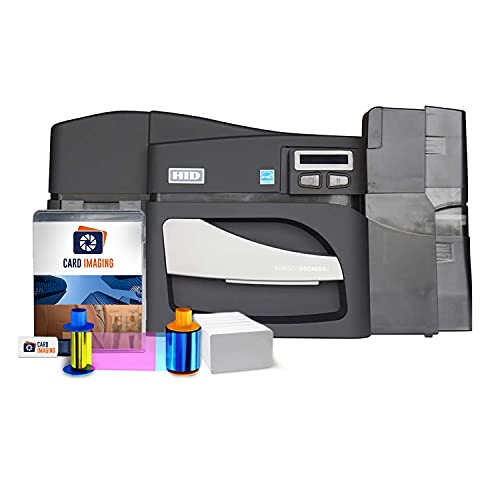
This Fargo DTC4500e printer bundle is designed for high-volume, professional dual-sided ID card printing. Featuring a 500-image color ribbon, 100 PVC cards, and detailed card imaging software, it meets demands for rapid badge preparation with crisp image quality.
The dual input hopper allows loading of two different card types, improving workflow flexibility in environments like universities or large corporations. The smart LCD screen facilitates intuitive operations with easy access to printing features, enhancing efficiency.
IDP Genuine SMART-31 and SMART-51 Ribbon Kit

This IDP Genuine ribbon kit is designed explicitly for the SMART-31 and SMART-51 series card printers, delivering high-quality, full-color images using YMCKO color ribbons along with resin black and overlay panel ribbons. Each roll supports printing up to 250 glossy PVC cards.
Included is a cleaning roller that helps maintain printer performance by removing dust and debris during printing. It is an ideal consumable choice for small businesses or larger corporations managing secure ID badges, student IDs, or loyalty cards with rich color fidelity.
Buying Guide for Smart ID Card Printers
Print Quality and Resolution
High resolution (300 dpi or more) is critical for sharp images and readable text on ID cards. Direct-to-card (DTC) printing is common, offering precise color output without requiring complex setups.
Single vs Dual-Sided Printing
Decide if your organization needs cards with information or graphics on both sides. Dual-sided printers improve security and design options but typically cost more. Single-sided printers suffice for basic ID badges.
Printer Compatibility and Supplies
Ensure ribbons, overlays, and cards are compatible with your chosen printer model. Genuine ribbons from the printer manufacturer often provide the best print quality and reliability.
Software and Ease of Use
Look for printers that include or support intuitive badge creation software, allowing users to design professional IDs without advanced graphic skills. Automation features reduce errors and speed production.
Print Volume and Speed
Consider how many ID cards you need to produce regularly. Printers vary in speed; high-volume businesses benefit from machines with dual input hoppers or bulk card feeders.
Security Features
Some printers offer holographic overlays, built-in encoding for access control, or ribbon shredders for secure disposal of used ribbons, protecting confidential printed data.
System Compatibility
Check that your printer and software support your operating system, whether Windows, Mac, or both.
Budget Considerations
Factor in initial printer cost plus ongoing expenses for ribbons, cards, cleaning kits, and maintenance to assess total cost of ownership.