Best USB a to B Printer Cables for Reliable High-Speed Printing
Choosing the right USB A to B printer cable is essential for ensuring stable and fast data transfer between your computer and printer or other devices. The market offers various options with different lengths, build qualities, and compatibility features. Below is a comparative summary of top USB A to B printer cables available on Amazon, ideal for printers, scanners, external hard drives, MIDI devices, and more.
| Product | Brand | Length | Key Feature |
|---|---|---|---|
| Amazon Basics USB-A to USB-B 2.0 Cable | Amazon Basics | 16 Feet | Gold-plated corrosion-resistant connectors |
| UGREEN USB A to USB B Printer Cable | UGREEN | 5 Feet | High-speed 480 Mbps & wide compatibility |
| sweguard Printer Cable High Speed Nylon Braided | sweguard | 10 Feet | Nylon braided with gold-plated connectors |
| AINOPE USB A to USB B Nylon Braided Cable | AINOPE | 6.6 Feet | 100% gold-plated connectors with enhanced shielding |
| HUHUTa 6FT USB 2.0 Printer Cable | HUHUTa | 6 Feet | Universal compatibility with MIDI and printer devices |
Amazon Basics USB-A to USB-B 2.0 Printer Cable

This Amazon Basics cable features gold-plated, corrosion-resistant connectors that maintain optimal signal transfer. At 16 feet, it offers excellent reach for various setups. It connects speed-critical devices such as external hard drives, printers, and cameras to your computer. This cable ensures reliability for daily printing tasks or device synchronization with low interference.
UGREEN USB A to USB B Printer Cable 5ft High-Speed
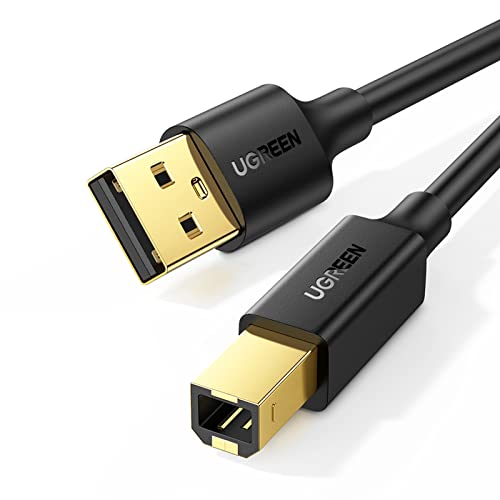
The UGREEN 5-foot cable offers transfer speeds of up to 480 Mbps for efficient data transmission and is backward compatible with older USB standards. Known for its wide compatibility, it supports many printer brands, scanners, external drives, and MIDI devices. This cable maintains a more stable connection than Wi-Fi, suitable for office or home setups.
sweguard USB-A to USB-B Nylon Braided Printer Cable

This 10-foot USB 2.0 printer cable features a durable nylon braided jacket with gold-plated connectors to minimize corrosion and interference. It provides high-speed data transfer up to 480 Mbps, supporting a broad range of devices from HP, Canon, Dell, Epson, Brother, Lexmark, to Yamaha digital pianos. Its robust design enhances longevity and cable flexibility.
AINOPE USB A to USB B Nylon Braided Printer Cable

The AINOPE cable combines a premium nylon braided jacket with 100% gold-plated connectors and high-purity copper wire for stable signal transmission. Supporting up to 480 Mbps data transfer, it reduces EMI/RFI interference efficiently. The cable is fully backward compatible and offers plug-and-play convenience for printers, scanners, MIDI controllers, and other USB B devices.
HUHUTa 6FT USB 2.0 Printer and Scanner Cable

This 6-foot cable supports many popular printer and MIDI devices including models by Epson, HP, Brother, Lexmark, Samsung, and more. Offering up to 480 Mbps data transfer speed, it ensures a stable wired connection superior to Wi-Fi. Its compatibility with scanners, fax machines, and musical instruments makes it versatile for multiple device types.
Buying Guide for USB A to B Printer Cables
When selecting a USB A to B printer cable, consider these key factors to ensure optimal performance and compatibility:
1. Device Compatibility
Check that the cable supports your printer model or other USB B devices such as scanners, external hard drives, MIDI keyboards, or cameras. Leading cables offer broad compatibility with brands like HP, Canon, Brother, Epson, Dell, Lexmark, Samsung, and Xerox.
2. Cable Length
Choose a length that suits your workspace. Longer cables (10-16 feet) offer flexibility in placement but can potentially reduce signal quality if poorly made. For typical desk setups, 5-6 feet cables are sufficient and provide better signal integrity.
3. Build Quality and Durability
A nylon braided exterior or reinforced PVC jacket provides durability against bending and wear. Gold-plated connectors resist corrosion and ensure reliable electrical contact, reducing signal dropouts and interference.
4. Data Transfer Speed
Look for USB 2.0 cables supporting up to 480 Mbps for fast printing and scanning. This speed supports standard office and home device requirements. Backward compatibility with USB 1.1 and 1.0 ensures connection with older devices.
5. Signal Stability and Interference Shielding
Cables with enhanced shielding minimize electromagnetic interference (EMI) and radio frequency interference (RFI), delivering clearer and more consistent prints and scans. This is especially important in environments with many electronic devices.
6. Connector Quality and Cable Flexibility
Gold-plated connectors and high-quality copper wires prevent oxidation and maintain conductivity. Flexibility in the cable ensures it won’t easily tangle or break during routine use, enhancing longevity.
7. Price and Warranty
While price varies, prioritize cables with good customer reviews and manufacturer warranties to protect against early defects or failures. Avoid overly cheap cables that compromise build quality.
By evaluating these factors carefully, you can select a USB A to B printer cable that ensures a stable, fast, and reliable connection between your computer and devices for all your printing and data transfer needs.