Best USB Printer Cable Adapters for Reliable High-Speed Connectivity
Choosing the right USB printer cable adapter is crucial to ensure efficient data transfer between your computer and printer or other devices. Whether you need a USB Type-A to USB Type-B cable, a USB-C connection, or a parallel port adapter for older printers, there are multiple options available. Below is a comparison table summarizing the top 5 selected USB printer cable adapters that combine compatibility, speed, and durability.
| Product | Brand | Key Features |
|---|---|---|
| SABRENT USB to Parallel IEEE 1284 Printer Cable Adapter | SABRENT | Supports multiple OS, IEEE 1284 Bi-Directional, 12Mbps transfer rate |
| CableCreation USB B to USB C Printer Cable 6.6FT | CableCreation | USB 2.0 High-Speed (480 Mbps), Type B to Type C connection, supports MIDI devices |
| UGREEN 10FT USB to Parallel Port Printer Cable | UGREEN | USB to Parallel port, supports Windows/Mac/Linux, 12 Mbps fast transmission |
| Amazon Basics USB-A to USB-B 2.0 Cable, 16 Foot | Amazon Basics | Gold-plated connectors, compatible with printers & external drives, durable |
| MOSWAG 2in1 USB C to B Printer Cable 5Feet | MOSWAG | USB-C to USB-B, supports MIDI devices, 480 Mbps data transfer, wide compatibility |
SABRENT USB to Parallel IEEE 1284 Printer Cable Adapter

The SABRENT USB to Parallel IEEE 1284 Printer Cable Adapter offers a robust solution for connecting older parallel port printers to modern USB-enabled computers. It supports multiple operating systems including Windows and Mac, ensuring broad compatibility. Featuring the IEEE 1284 bi-directional parallel interface, this adapter can reach data transfer speeds up to 12 Mbps, making it efficient for legacy printing tasks. Its durability and ease of use make it suitable for users who require functionality with older printers that do not have native USB ports.
CableCreation USB B to USB C Printer Cable 6.6FT
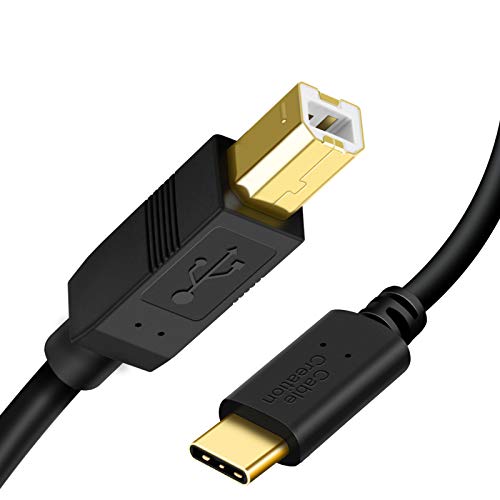
This CableCreation USB B to USB C Printer Cable is designed for high compatibility, connecting USB-C enabled devices like MacBook Pro, Surface Book 2, and Chromebook Pixel to USB B 2.0 legacy devices including printers, scanners, and MIDI instruments. Supporting USB 2.0 high-speed transfer up to 480 Mbps, this cable ensures a stable and fast wired connection superior to Wi-Fi. Note that it supports USB 2.0 Type-B Female port and is not compatible with USB 3.1 Type B or Mini-USB ports.
UGREEN 10FT USB to Parallel Port Printer Cable

The UGREEN USB to Parallel Port Printer Cable caters to users with older printers requiring parallel port connectivity. This 10-foot cable offers flexibility with extended length and is compatible across Windows, Mac, and Linux platforms. It supports fast data transmission rates up to 12 Mbps of the IEEE 1284 standard, facilitating quick and reliable print jobs. Its sturdy build and wide OS support make it an excellent choice for legacy printer users.
Amazon Basics USB-A to USB-B 2.0 Cable for Printer or External Hard Drive

The Amazon Basics USB-A to USB-B 2.0 Cable is engineered for speed-critical devices including printers, external hard drives, and cameras. Its gold-plated connectors prevent corrosion and enhance signal quality for consistent data transfer. This 16-foot cable enables easy connection between USB Type-A computers and USB Type-B peripherals, offering durability and stable connectivity for both personal and professional use.
MOSWAG 2in1 USB C to B Printer Cable 5Feet

The versatile MOSWAG 2in1 USB C to B Printer Cable supports both printing and MIDI connections, making it suitable for a range of USB B devices like printers, scanners, and musical instruments. Compatible with USB-C Macs and PCs, it delivers USB 2.0 speed transfers up to 480 Mbps. The cable provides a stable wired alternative to wireless connections for dependable performance across diverse setups.
Buying Guide for USB Printer Cable Adapters
Selecting the best USB printer cable adapter can be simplified by understanding key factors that influence compatibility and performance:
1. Connector Types and Compatibility
- USB Type-A to Type-B: Common for most printers and external devices.
- USB-C to Type-B: Ideal for modern devices with USB-C ports pairing with traditional printers.
- USB to Parallel Port: Necessary for older legacy printers without USB.
- Verify that your computer and printer ports match the cable connectors to avoid purchasing incompatible adapters.
2. Data Transfer Speed
- USB 2.0: Supports up to 480 Mbps, adequate for most printers and audio devices.
- Parallel IEEE 1284: Speeds typically up to 12 Mbps for older printers.
- Faster speeds ensure quicker print jobs and better performance when transferring large files or high volumes.
3. Length and Build Quality
- Choose cable length based on your workstation setup to avoid slack or strain on connectors.
- Look for gold-plated connectors or corrosion-resistant material for durability and signal integrity.
4. Operating System Support
- Ensure adapter compatibility with your computer’s OS, including Windows, Mac, and Linux if applicable.
5. Additional Features
- Some cables offer MIDI compatibility for musical instruments alongside printer connections.
- Adapters with plug-and-play design require no driver installation for easy setup.
- Adapters with built-in safety components like pull-up resistors enhance reliability and reduce data errors.