Best USB Switch Boxes to Share Printers Between Computers
Sharing a printer between multiple computers can streamline workflows and reduce clutter. A USB switch box allows easy switching of USB devices like printers, scanners, and keyboards between computers without needing to unplug cables. Below is a summary of some of the top USB switch boxes designed specifically for printer sharing, featuring compatibility, number of ports, switching modes, and ease of use.
| Product | Ports | Switching Method | Compatibility |
|---|---|---|---|
| UGREEN USB Switch Selector | 2 in / 4 out | One-button swap | Windows, Mac, Linux, Chrome OS |
| RIIEYOCA USB Printer Sharing KVM | 2 computers | Panel button & desktop controller | Plug & play, no drivers required |
| iDsonix USB 3.0 Switch | 1 in / 2 out (bi-directional) | One-click switch | USB 3.0 & backward compatible |
| BENFEI USB 3.0 Switch | 2 in / 4 out | Button switch with LED indicator | Windows, Mac, Linux, Chrome OS |
| IOGEAR 2 Port USB 2.0 Switch | 2 port | Auto/manual switching | USB 2.0, Windows compatible |
UGREEN USB Switch Selector 2 Computers Sharing 4 USB Devices

The UGREEN USB Switch Selector allows you to share four USB 2.0 devices like printers, scanners, keyboards, and mice between two computers with a simple one-button swap. It supports plug-and-play across Windows 10/8/7, Mac OS X, Linux, and Chrome OS without requiring drivers. Ideal for users who want to share multiple peripherals without constantly unplugging cables. Note that it does not transmit video signals and is not a KVM switch. When using multiple devices at once, powering the setup externally is recommended to avoid disconnections.
RIIEYOCA USB Printer Sharing KVM Switch with Remote Control

This USB printer sharing KVM switch features dual switching modes: a panel button for quick manual switching and a desktop controller cable for remote switching up to 1.5 meters. Supporting two computers sharing printers, scanners, keyboards, and other USB devices, it requires no drivers and offers plug-and-play convenience. Its built-in high-quality signal chip ensures stable transmission and allows USB cable extensions up to 5 meters, offering smooth and reliable switching in compact size, saving desk space.
iDsonix USB 3.0 Switch 1 in 2 Out for Printer Sharing

The iDsonix USB 3.0 switch enables users to share one USB device, including printers, scanners, keyboards, and more, between two computers with a single click. It supports USB 3.0 data transfer speeds up to 5Gbps and is backward compatible with USB 2.0 and 1.1. Designed for tidier workspaces, it’s ideal for quickly switching between computers without unplugging. It is not recommended for frequently switching mass storage devices and comes with two 3.3ft USB A to A cables for optimal connection stability.
BENFEI USB 3.0 Switch Sharing 4 USB Devices Between Two Computers

The BENFEI USB switch supports sharing up to four USB 3.0 devices like printers, scanners, mice, and keyboards between two computers. It operates at speeds up to 5Gbps and is backward compatible with USB 2.0. Drivers are not needed as it supports multiple operating systems including Windows, Mac OS, Linux, and Chrome OS. Switching is done via a button with an LED indicator that shows the active device. Users should use BENFEI USB A to USB A cables for guaranteed functionality.
IOGEAR 2 Port USB 2.0 Switch With Auto and Manual Switching
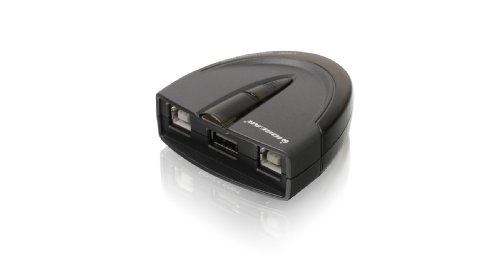
The IOGEAR USB 2.0 switch offers the ability to share one USB printer between two workstations with simple plug-and-play functionality. It supports data transfer speeds up to 480Mbps and features automatic switching software to detect which computer is sending print tasks. Manual switching can also be done with the button on the device. Plug and play compatibility with Windows systems makes it an easy solution for small offices or home setups.
Buying Guide for USB Switch Boxes for Printers
When selecting a USB switch box for sharing printers among multiple computers, consider the following factors to ensure the best fit for your needs:
Number of Ports and Devices Supported
Determine how many USB devices you wish to share simultaneously. Some switches share one device between two computers, while others allow multiple USB peripherals such as mouse, keyboard, and flash drives along with printers.
Data Transfer Speed
For printer sharing, USB 2.0 speed is generally sufficient, but if you plan to share data-intensive devices, a USB 3.0 switch with speeds up to 5Gbps provides better performance and future-proofing.
Switching Method
Common mechanisms include manual push-buttons, remote desktop controllers, or automatic switching via software detection. Choose a switching method that suits your convenience and workstation setup.
Operating System Compatibility
Ensure the device supports your operating systems including Windows, Mac OS, Linux, or Chrome OS. Driver-free or plug-and-play functionality is ideal for hassle-free operation.
Build Quality and Size
Metal casing switches often offer better durability than plastic. Compact sizes help minimize desk clutter, especially in tight workspaces.
Power Requirements
Some multi-port switches may require external power when sharing several devices simultaneously to maintain stable connections without disconnects.
Additional Features
Look for LED indicators to show which computer has control, cable length for convenience, and compatibility with USB hubs if you intend to expand the number of connected devices.
Considering these factors will ensure you select a USB switch box that effectively streamlines printer sharing and improves productivity without complexity.